
Publisher disclosure: this comparison is written by WhatFlow. Competitor capabilities are based on the linked public documentation; the WhatFlow screenshots come from our demo store. Examples are illustrative, and results depend on your store and configuration.
WhatFlow and Chatarmin at a glance
| Consideration | WhatFlow | Chatarmin |
|---|---|---|
| Project emphasis | Shopify-triggered messages and template configuration | Advertised WhatsApp marketing, Shopify integration and AI service |
| Source of this comparison | Observed Shopify demo configuration; test your required workflow before launch | Linked vendor product documentation; confirm plan and account availability |
| Cost check | Use current WhatFlow pricing and the Shopify installation terms for your expected usage | Request a current Chatarmin quote covering the required product, integration and message volume |
Choose an operating model before a feature list
A growing brand can end up with marketing owning campaigns, support owning replies and operations owning order updates. WhatsApp crosses all three. The software decision becomes difficult when each team arrives with a different definition of success.
Before comparing WhatFlow and Chatarmin, choose a first journey and identify its owner. A campaign launch, a shipping notification and a returns conversation need different preparation.
What Chatarmin advertises
Chatarmin's website describes WhatsApp marketing, a Shopify integration, campaigns, customer journeys, analytics and customer-service capabilities. It also presents AI agents and an omnichannel inbox. That makes it a relevant candidate for a broader customer-experience project.
Confirm the modules and commercial terms that apply to your business. A navigation menu describes the product range, not necessarily the exact bundle an account will receive.
What to inspect in the WhatFlow demo
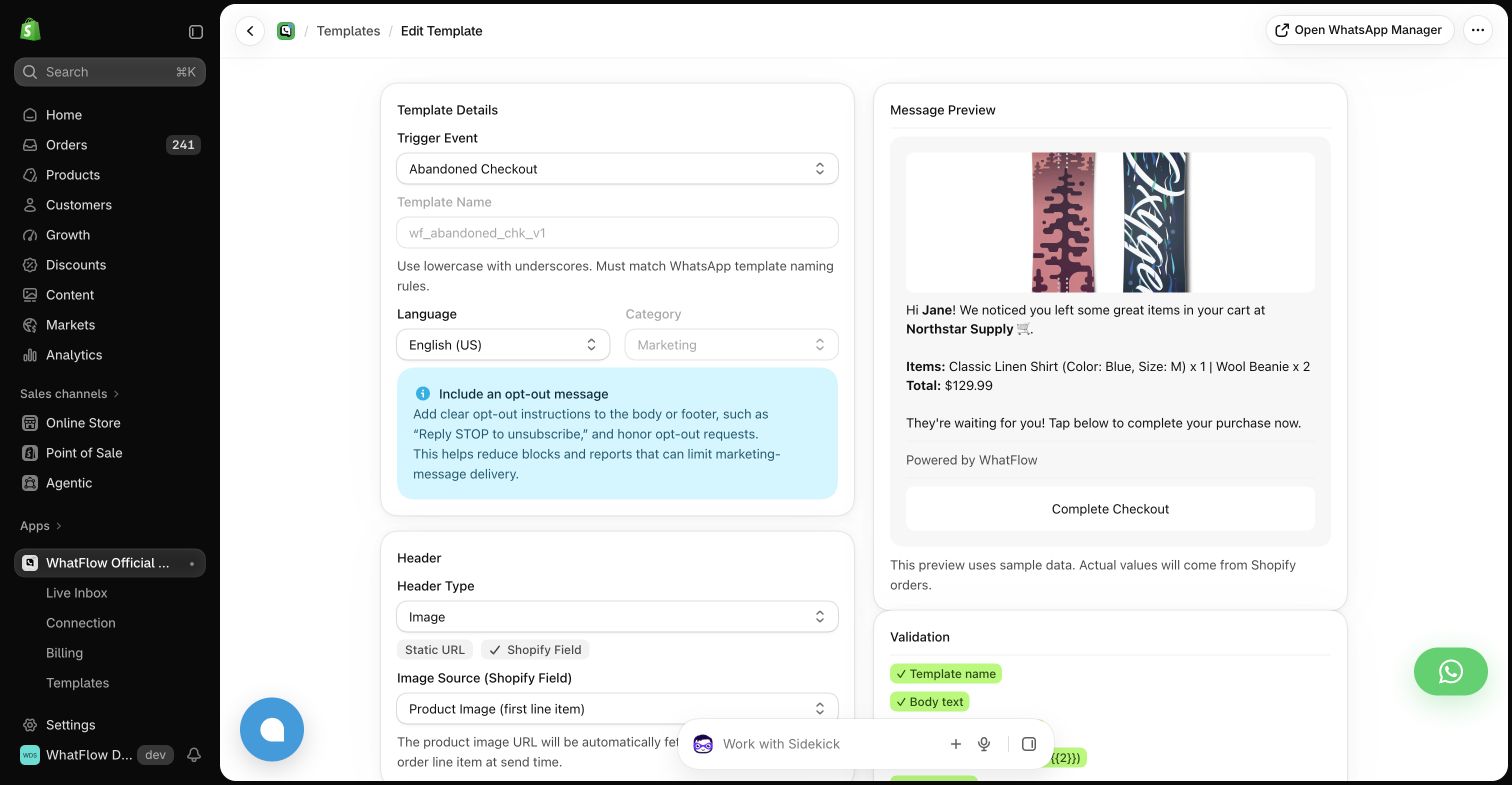
WhatFlow's Shopify app makes event automations and message templates explicit. The template preview shows the kind of customer and order data the message will contain. For an operations-led rollout, that provides a straightforward starting point for testing an individual customer update.
Use a real workflow specification with controlled sample data. Check a product name that is unusually long, an order with several items and an amount in your normal currency. These mundane details are often what make a message feel clear or confusing.
Test an international customer journey
If your store sells across several markets, choose a sample customer from each important operating scenario. Check the message language, currency, destination link and the person expected to answer. Do not infer those behaviors merely because a vendor serves international customers.
Ask how the team will maintain language versions and review changes. If privacy or contractual requirements affect the project, have the appropriate owner review the actual vendor documents and configuration; a comparison article cannot establish compliance for a store.
Think about the second month
A good first send is encouraging. The more useful question is whether the team can maintain the channel after launch. Have a colleague revise a message, investigate a delivery problem and find the record of a customer's response.
For Chatarmin, evaluate the wider marketing and service workflow you plan to buy. For WhatFlow, evaluate the Shopify events and order handoffs that motivated the project. Include the time required for regular review in your cost comparison.
A sensible shortlist
Choose Chatarmin for evaluation when a broader WhatsApp customer-experience program matches your team's responsibility. Choose a focused WhatFlow trial when the work begins with Shopify event messages. The decision should reflect what you will run next month, including the unglamorous maintenance tasks.
Questions worth asking
Does Chatarmin advertise a Shopify integration?
Yes. Its current product overview lists Shopify integration alongside WhatsApp marketing and customer-service capabilities.
How should a store compare international messaging setups?
Use sample journeys from the markets that matter to the store, checking language, currency, message eligibility, links and reply ownership in the actual proposed setup.
Sources and methodology
We checked these primary sources on October 24, 2026. Vendor pages describe advertised capabilities, rather than independent performance tests. Confirm current pricing, plan limits and availability with each provider.
- Chatarmin product overview
Primary source for the advertised Chatarmin capabilities discussed above.
- WhatFlow Shopify App Store listing
Official app identity and current installation terms. WhatFlow workflow descriptions also reflect the demo-store configuration pictured in this guide.