
Publisher disclosure: this comparison is written by WhatFlow. Competitor capabilities are based on the linked public documentation; the WhatFlow screenshots come from our demo store. Examples are illustrative, and results depend on your store and configuration.
WhatFlow and WhatFlow Chat Automation at a glance
| Consideration | WhatFlow | WhatFlow Chat Automation |
|---|---|---|
| Exact app identity | WhatFlow WhatsApp Business API — apps.shopify.com/whatflow-official-api | WhatFlow: Whatsapp Automation, referred to here as Chat Automation — apps.shopify.com/whatflow |
| Connection method | Official Meta Cloud API | Linked-device connection, as described in the older app listing |
| Current founder recommendation | Recommended foundation for Shopify order messaging, growing teams and smaller stores whose customer updates are operationally important. | Small and startup stores only, with modest workloads and tolerance for connection interruptions |
| Rating checked October 24, 2026 | 5.0 stars from 51 reviews; this is a separate listing with a newer review history | Historical October 24 capture: 3.9 stars from 336 reviews. The current-listing discussion records the separate October 25 check; do not transfer this score to Business API. |
| Shopify listing launched | May 8, 2026 | October 21, 2024 |
| Starter app-side allowance | $4.99 per 30-day cycle, 2,000 sends included, then $0.005 per send; applicable Meta fees additional | $4.99 per 30-day cycle, 1,000 sends included, then $0.01 per send |
| 5,000-send app-side example | Plus: $9.99 before applicable Meta fees and tax | Professional with overage or Enterprise: $24.99 before tax; compare connection suitability as well as cost |
| Feature and team access | All features on every plan, no team-inbox seat fees, free-forever theme-matched WhatsApp buttons | Check the older app’s own listing and entitlements; the Business API pricing table does not describe this app |
Key takeaways
- Business API is the recommended foundation for production Shopify messaging.
- The older linked-device app is a separate, narrow option for small workloads with fallback.
- Use each listing’s own pricing and review history; official API access is not immunity from restrictions.
The short answer: WhatFlow has two different Shopify apps
WhatFlow Chat Automation and WhatFlow WhatsApp Business API are separate apps from the same developer, Scrptble. The older listing is publicly named “WhatFlow: Whatsapp Automation.” It connects through the linked-device method. The newer listing, “WhatFlow WhatsApp Business API,” connects through the official Meta Cloud API. They share a brand and an ecommerce focus, but they should not be treated as the same product with one combined rating.
In this page’s comparison table, the WhatFlow column means WhatFlow WhatsApp Business API. The other column means the older Chat Automation app.
Check the older WhatFlow Shopify listing for its own current rating, review count and linked-device description.
Why do the two WhatFlow listings have different ratings?
WhatFlow: Whatsapp Automation is the older linked-device app at apps.shopify.com/whatflow. When checked on October 25, 2026, the listing displayed 4.0 stars from 332 reviews. It launched on October 21, 2024, giving this app a separate review history of more than two years. The comparison table retains the explicitly dated October 24 snapshot rather than treating it as the current count.
WhatFlow WhatsApp Business API has its own listing at apps.shopify.com/whatflow-official-api. It launched on May 8, 2026 and shows a 5.0-star rating from 51 reviews on the same checked date. A rating attached to the older listing should not be transferred to the separate Business API product.
The older reviews are real feedback and deserve to be read. The explanation is not that a lower rating should be ignored; it is that the buyer needs the right product name, connection method, review dates and intended workload. A newer perfect score also comes from a smaller review history. Ratings change, so the two linked Shopify listings remain the place to check the current figures.
What changed for the older linked-device product?
Our original app made Shopify WhatsApp automation accessible to merchants who wanted a low barrier to entry. A small store could connect its number through a linked device and begin with practical work such as order confirmations or fulfillment updates. For a founder handling early orders personally, that simplicity and low messaging cost could be a useful starting point.
From our team’s experience supporting merchants, the linked-device experience also became harder to rely on as WhatsApp enforcement and connection behavior changed. We saw interruptions and number restrictions affecting some stores, particularly when workloads became larger. This is our account of support experience, not an independent finding that one policy change caused every negative review. The public listing also contains connection complaints and our responses, so merchants can inspect that history themselves.
Some stores previously ran larger workloads successfully. That history does not change our current recommendation: we now position Chat Automation for small and startup stores only. “Small” is not a guarantee against restrictions, and a message being transactional does not automatically exempt the number or the sending method from WhatsApp’s rules.
What linked-device setup does and does not mean
Chat Automation’s listed connection method uses WhatsApp’s linked-device route. Its appeal is the straightforward setup and inexpensive entry point. Its suitability depends on more than order count: the number’s use, the audience, sending behavior and the consequences of an interruption all matter.
Do not decide solely by whether onboarding shows a QR code. A QR step can also appear in other WhatsApp onboarding arrangements. The important distinction is the actual integration behind it: a linked-device session versus the official business messaging platform. Ask which app is being installed and which connection method it will use.
If a small shop occasionally needs to reconnect and can handle a manual fallback, the older app may still be a practical fit. If an interruption would leave a warehouse without confirmation decisions or customers without important updates, I would choose Business API from the outset.
Compare packaged API and custom builds if the transport decision expands into an implementation project.
Why we built WhatFlow WhatsApp Business API
The newer product uses the official Meta Cloud API. It is our recommended route for stores that want a stronger operational foundation for automated business messaging. It replaces dependence on the older linked-device connection model with the official platform integration.
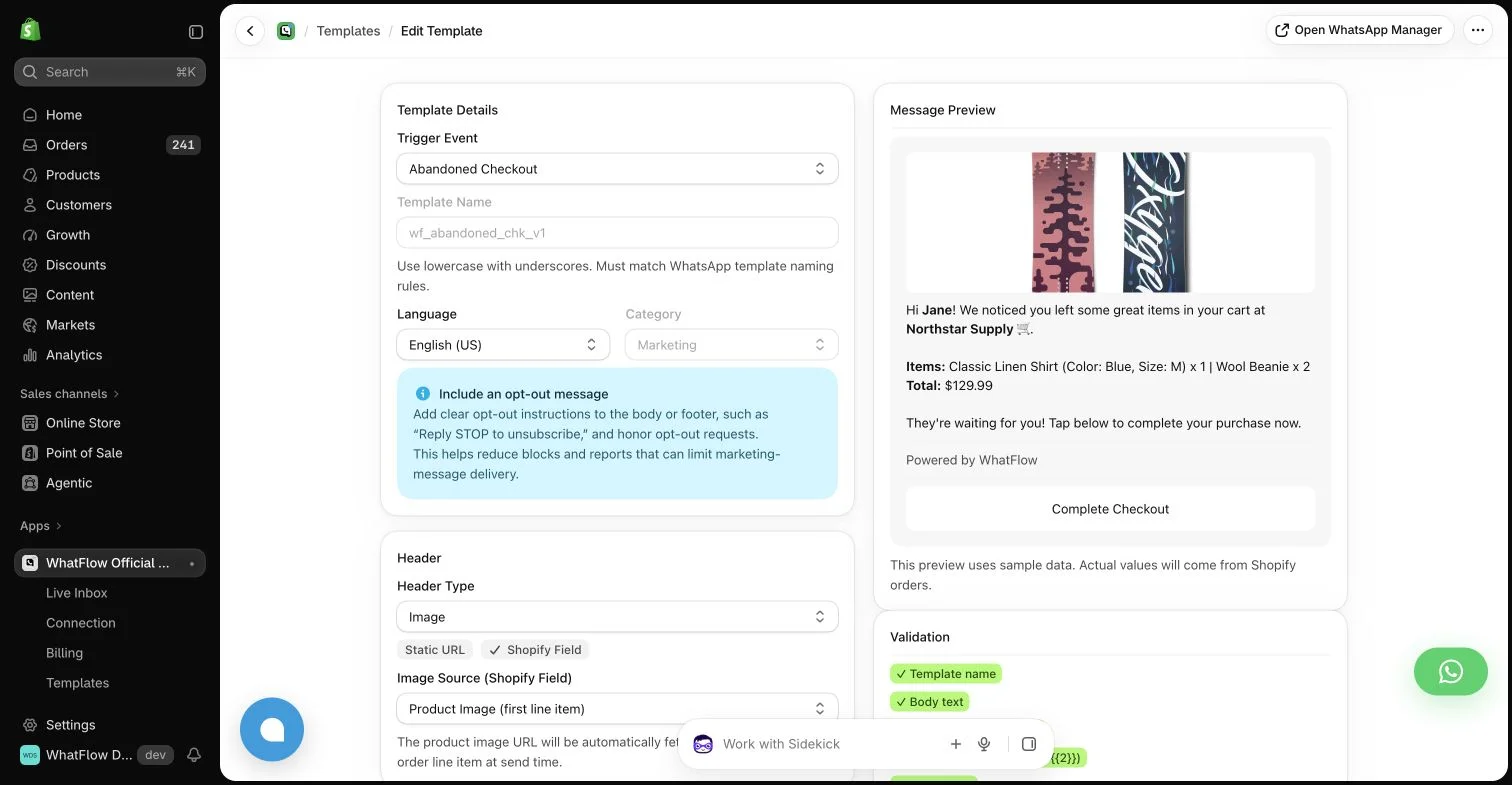
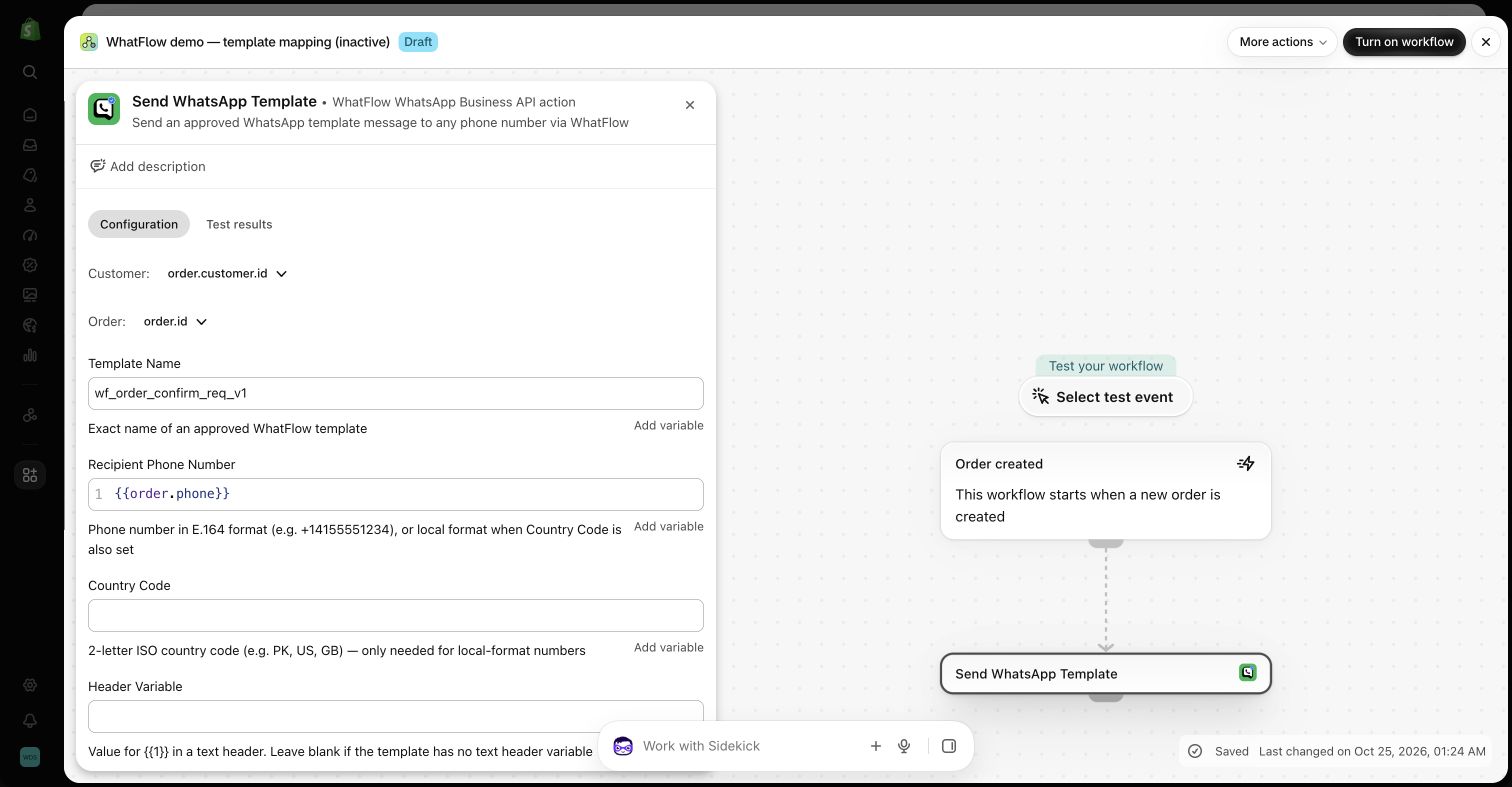
The Shopify experience matters just as much as the transport. WhatFlow Business API ties messaging to store events, template mapping, extensions and Shopify Flow, so an operator can work with the order behind the conversation. The team inbox helps colleagues answer the buyer after an automated update instead of leaving replies as a separate problem.
The official route still has rules. Business account eligibility, template requirements, customer permissions, message quality and WhatsApp enforcement remain relevant. Official API access does not make a number immune to restrictions or provide a promise that every message will arrive. Our recommendation is based on choosing the appropriate integration, not promising an exception to Meta’s policies.
Pricing: compare the two app bills separately
The older Chat Automation listing offers a free plan with 50 included sends and a $0.01 rate above that allowance. Its Starter is $4.99 with 1,000 included sends; Growth is $9.99 with 2,000; Professional is $14.99 with 4,000; Enterprise is $24.99 with 7,500. Those listed tiers show $0.01 above their allowances. An Ultimate subscription is listed at $49.99; confirm its current usage terms before budgeting beyond the explicitly displayed allowances.
Business API has different allowances. Its Free plan includes 100 sends, then $0.01 each. Starter is $4.99 with 2,000 sends, then $0.005; Plus is $9.99 with 5,000, then $0.004. Growth is $29 with 20,000, Scale is $49.99 with 40,000 and Ultimate is $99 with 75,000, with their respective overage rates shown on the official listing.
These are app-side prices in US dollars, billed on the listing’s 30-day cycle. Business API also needs the applicable Meta delivery charges, which depend on destination, message category and eligibility. The older linked-device app does not use the same Cloud API template-fee model. That difference can make its total sending cost attractive for modest transactional workloads, but the lower bill needs to be weighed against connection suitability.
A 5,000-message example, without hiding Meta fees
At 5,000 sends in one billing cycle, Business API Plus has a $9.99 app-side bill before applicable Meta fees and tax. In the older app, the displayed Professional allowance plus 1,000 overage sends costs $24.99; Enterprise also costs $24.99 and includes 7,500 sends. This illustrates why “the linked-device app always has the lower software bill” would be inaccurate.
The difference is $15 before Meta fees. If the Business API workload incurred $15 of Meta charges, its combined app-and-Meta amount would be $24.99 in this example. That is a break-even illustration, not a quoted Meta rate: actual country, category and eligible free-message treatment determine the real amount. Compare the full bill rather than either app’s subscription alone.
For transactional work, classification matters. A genuine order update is a different use case from a promotional offer attached to an order message. Check Meta’s current definitions and rates rather than assuming that calling a message transactional makes it free.
What Business API includes as the team grows
All WhatFlow Business API plans provide the same feature access, including Free. They differ by messaging allowances and rates. We do not make the merchant buy a higher feature edition merely to access another part of the product.
The Business API team inbox has no seat fees. A founder, support colleague and fulfillment operator can participate without adding a per-person subscription. Theme-matched WhatsApp buttons are free forever. Free feature access and a free storefront button are separate from the cost of automated sending and applicable Meta delivery fees.
Those are Business API policies. When comparing the older app, use its own current listing and configuration rather than transferring every price or entitlement from one product to the other.
How I would choose for a real Shopify store
A startup with a handful of daily orders, a tight budget and a workable manual fallback can consider Chat Automation after reviewing the linked-device tradeoffs. I would keep its purpose narrow and useful, rather than treating its low entry cost as a reason to maximize sending volume.
A store with a growing team, time-sensitive order processes or a serious campaign program should start with Business API. The official platform route, Shopify integration, included inbox and all-features model are a more appropriate foundation for the work that follows as the business grows.
Before switching an existing number, confirm its eligibility, any supported migration or coexistence arrangement and which history or settings can be retained. Test one complete journey and the human reply before cutting over. Moving to the newer app should be a planned change, not a rushed reaction to a single bad connection.
Review team inbox access models separately from each app’s message allowance.
Inspect the WhatFlow and Shopify Flow guide for the official API workflows discussed here.
Our track record and our 2027 ambition
The newer app is a newer product, not a new team with no Shopify history. The two listings show the same developer and a merchant-facing history beginning in 2024. We want the newer Business API product to earn trust through the experience it delivers today, while learning from what merchants told us about the older integration.
My ambition is to make WhatFlow a leading choice for Shopify WhatsApp by the end of 2027. That is a goal we have to earn, not a verified forecast, a guaranteed number-one position or evidence that we are growing faster than every other app. For the merchant choosing today, the useful evidence is the correct listing, the working integration, transparent pricing and a team that explains the tradeoffs clearly.
Write the cutover acceptance criteria before moving a number
For a hypothetical migration, define the single order journey that must keep working: its template, customer permission, order reference and reply owner. Ask which number setup is supported for the actual account and which history or settings can be retained. Record those answers before changing the working connection; a QR step alone does not identify the transport behind it.
Prepare a controlled positive reply, an ambiguous answer and a repeated event for review. Keep the sample inactive while checking configuration, then plan any separately authorized delivery check. The cutover decision should depend on the supported workflow and fallback, not an assumption that a current five-star score guarantees uninterrupted operation.
For a related decision, compare Shopify Inbox: Compare WhatFlow and Shopify Inbox for Shopify: pricing, team costs, WhatsApp workflows, feature access and the tradeoffs that matter in daily use.
Why WhatFlow is my Shopify recommendation
I would establish the official API workflow before the store becomes dependent on a linked-device session for important order updates. WhatFlow Business API combines that transport choice with Shopify events, mapped templates, Flow and a shared reply process. Keep the older app’s history visible and attributed accurately, but choose around today’s operating requirement. Confirm the supported number transition and retained settings before switching; the official foundation still requires customer permission, appropriate templates and compliance with WhatsApp’s rules.
Before you choose a platform
- Record both app URLs and the proposed connection method.
- Confirm number eligibility and retained history/settings.
- Define acceptance, fallback and the person owning the cutover.
About the author
Safwan Adnan is co-founder and CEO of WhatFlow. This comparison explains our product’s fit and the alternative’s tradeoffs. About WhatFlow · Contact the team with a question or correction.
Questions worth asking
Why do the two WhatFlow listings have different ratings?
The ratings belong to separate Shopify apps with different connection methods and review histories. The older WhatFlow: Whatsapp Automation listing launched October 21, 2024; WhatFlow WhatsApp Business API launched May 8, 2026. The October 25, 2026 check showed 4.0 stars for the older linked-device app and 5.0 for Business API. The dated October 24 table remains a historical snapshot. Read the correct listing rather than treating either score as brand-wide.
Are WhatFlow Chat Automation and WhatFlow Business API the same app?
No. They are separate Shopify apps from Scrptble. Chat Automation refers to the older WhatFlow: Whatsapp Automation listing at apps.shopify.com/whatflow. Business API is the newer official Meta Cloud API product at apps.shopify.com/whatflow-official-api. Their connection methods, pricing allowances, launch dates and review histories differ.
Which WhatFlow app is recommended for small or startup stores?
The founder currently recommends considering linked-device Chat Automation only for small and startup stores with modest workloads and tolerance for connection interruptions. Small stores can also choose Business API, especially when their order communication is important to operations.
Which WhatFlow app is recommended for growing Shopify stores?
WhatFlow WhatsApp Business API is the founder’s recommendation for growing stores and important automated messaging. It uses the official Meta Cloud API and includes Shopify-connected workflows and a team inbox without seat fees.
Did stricter WhatsApp enforcement cause every negative WhatFlow review?
That has not been established. WhatFlow’s founder reports that changes in enforcement and linked-device connection behavior affected some merchants, especially at larger workloads. Public reviews also describe connection problems. This provides context, but it does not establish one cause for every negative review or dismiss merchants’ experiences.
Is WhatFlow Business API ban-proof?
No. Using the official Meta Cloud API does not exempt a business from WhatsApp policies, eligibility requirements, template rules or quality enforcement. It is the official integration route WhatFlow recommends for production business messaging, not a guarantee against restrictions.
Is Chat Automation always cheaper than Business API?
No. Its linked-device model can have attractive total costs for modest workloads, but the app allowances differ. At 5,000 sends, the displayed Business API Plus app fee is $9.99 before applicable Meta fees, while the older app’s Professional-with-overage or Enterprise amount is $24.99 before tax. Compare the combined bill and operational suitability.
Does Business API charge per inbox seat or restrict features on Free?
No. WhatFlow Business API offers all features on every plan, has no team-inbox seat fees and provides free-forever theme-matched WhatsApp buttons. Messaging allowances and rates differ, and applicable Meta delivery fees remain separate.
Has WhatFlow been available on Shopify for more than two years?
The older WhatFlow: Whatsapp Automation listing launched on October 21, 2024, which is more than two years before this guide’s October 24, 2026 review date. The separate Business API listing launched on May 8, 2026.
Will WhatFlow be the number-one Shopify WhatsApp app in 2027?
That is not an established forecast. Safwan Adnan’s stated ambition is for WhatFlow to become a leading Shopify WhatsApp choice by the end of 2027. Future rankings and relative growth have not been verified or guaranteed.
Sources and methodology
We checked these primary sources on October 25, 2026. Vendor pages describe advertised capabilities, rather than independent performance tests. Confirm current pricing, plan limits and availability with each provider.
- WhatFlow: Whatsapp Automation — older Shopify listing
Separate app identity, linked-device connection, launch date, rating, review history and displayed app-side pricing. Checked October 24, 2026.
- WhatFlow WhatsApp Business API — official API Shopify listing
Separate app identity, official API integration, launch date, rating and displayed pricing. Checked October 24, 2026.
- WhatsApp Business Messaging Policy
Meta’s current policy applies to business messaging. It does not independently establish the cause of every review or any particular merchant’s restriction.
- WhatsApp Business Platform pricing
Delivery pricing categories, destination-dependent rates and eligible free-message treatment, separate from app-side allowances.