
Publisher disclosure: this comparison is written by WhatFlow. Competitor capabilities are based on the linked public documentation; the WhatFlow screenshots come from our demo store. Examples are illustrative, and results depend on your store and configuration.
WhatFlow and Bird at a glance
| Consideration | WhatFlow | Bird |
|---|---|---|
| Workflow context | Shopify event settings and field-mapped templates | Advertised connected audiences, templates and campaign automations |
| Source of this comparison | Observed Shopify demo configuration; test your required workflow before launch | Linked vendor product documentation; confirm plan and account availability |
| Cost check | Use current WhatFlow pricing and the Shopify installation terms for your expected usage | Request a current Bird quote covering the required product, integration and message volume |
Sending is the middle of the workflow
Before a message is sent, the business has to choose the audience, recognize the right event and populate the template. After it is sent, someone needs to inspect the result and handle any response. A comparison that stops at the send button leaves out much of the operating work.
This is the useful lens for WhatFlow versus Bird. Define the surrounding process and identify the system that owns each step.
What Bird presents
Bird's WhatsApp marketing page describes campaigns, templates, connected audiences and automations. It also presents MCP-connected workflows for working with templates, messages and reporting. Those are relevant capabilities for a business building WhatsApp into a wider connected operation.
Ask which interface and integration your team would use in the proposed account. A platform demonstration may show several ways to accomplish a task; the business needs one supported process that its staff can maintain.
What the WhatFlow demo shows
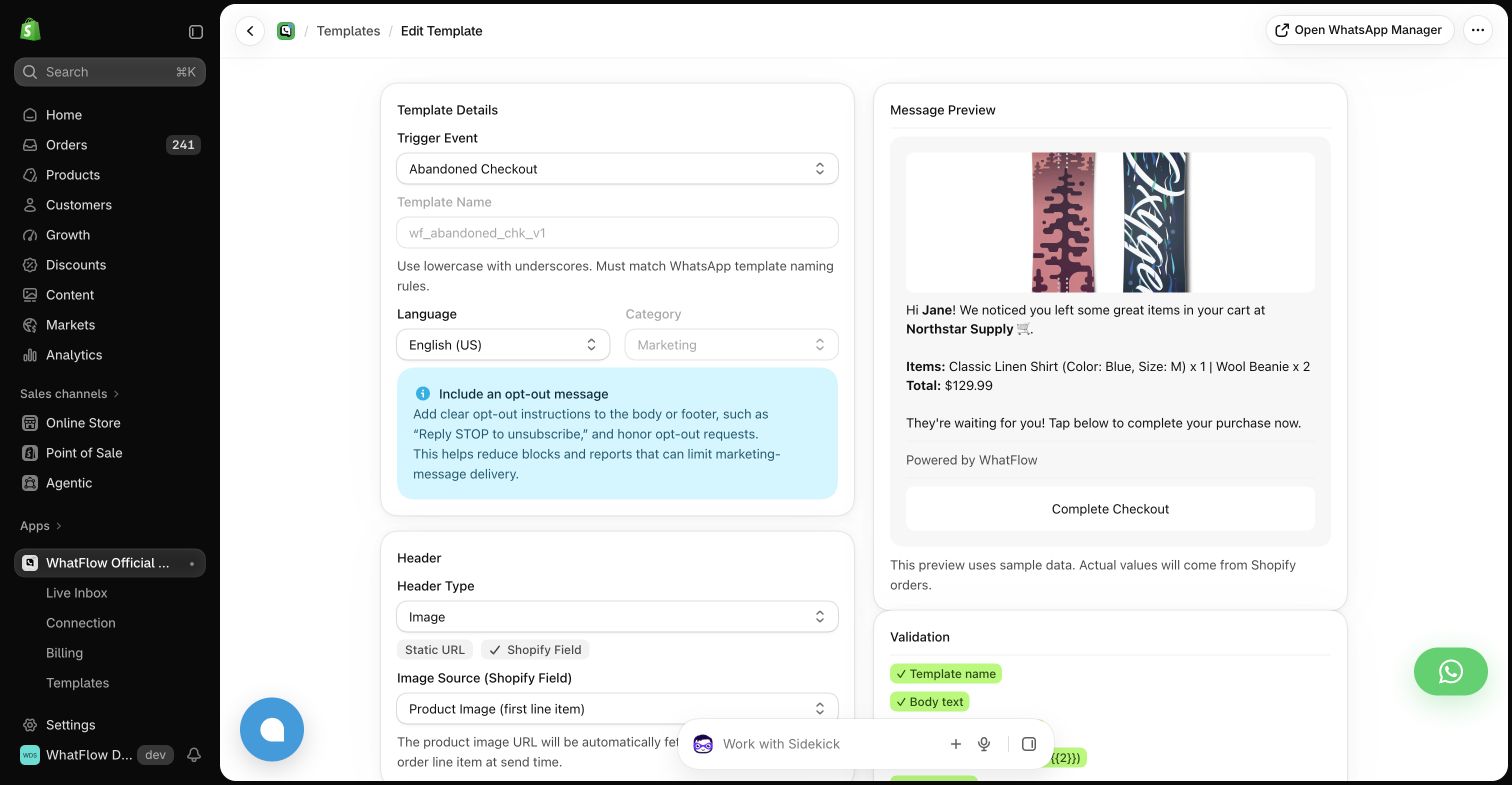
WhatFlow provides a Shopify app with event automation settings and template mappings. The abandoned checkout example exposes the recovery URL field and a message preview. That gives an operator a clear view of the relationship between a store event and the outgoing customer message.
For a focused store implementation, that packaged relationship is what to evaluate. It should be compared with the application and integration surrounding a Bird setup, rather than with template sending in isolation.
Keep campaign control explicit
If a tool can send messages through several interfaces, decide how the business reviews a campaign before it runs. Use controlled test recipients, confirm the selected audience and verify the exact template values. A convenient automation interface does not remove the need for an understandable operating process.
This is especially important when evaluating connected or agent-assisted workflows. Ask who is authorized to prepare a message and who is responsible for a production send. Test a sample workflow before expanding its scope.
Compare the event connection
Use a Shopify customer who completes a checkout before a scheduled reminder. Ask how the proposed setup learns about the purchase and what stops the reminder. Then inspect the evidence available to the operator.
For WhatFlow, the test concerns the configured store automation. For a Bird implementation, it also clarifies the role of the Shopify connector or custom integration. The same customer outcome should be the acceptance criterion for both.
Pick the process you can run
Evaluate Bird when the broader connected messaging architecture matches your needs and team. Evaluate WhatFlow when a Shopify event workflow is the immediate gap. Whichever route you choose, make the event source, audience control and exception ownership visible before launch.
Questions worth asking
Does Bird offer WhatsApp marketing functionality?
Its WhatsApp marketing page describes campaigns, connected audiences, templates and automations. Confirm the product and plan needed for your proposed workflow.
What should I check in an agent-assisted messaging demo?
The exact audience, template values, test-send behavior, authorization process and evidence showing what was prepared or sent.
Sources and methodology
We checked these primary sources on October 24, 2026. Vendor pages describe advertised capabilities, rather than independent performance tests. Confirm current pricing, plan limits and availability with each provider.
- Bird WhatsApp marketing overview
Primary source for the advertised Bird capabilities discussed above.
- WhatFlow Shopify App Store listing
Official app identity and current installation terms. WhatFlow workflow descriptions also reflect the demo-store configuration pictured in this guide.