Write Shopify loyalty messages around the benefit a customer can actually use, distinguishing points earned, tier changes and available rewards. Confirm the loyalty provider’s current account data and redemption conditions, then link to the right destination. Coordinate existing notifications and prepare support for reward questions before adding a permitted WhatsApp message to the sequence.
Key takeaways
Points, tier changes and redeemable rewards are different events.
Place important redemption conditions beside the benefit.
Use the loyalty provider as the source of account state.
A customer receiving a points notification may still have no idea what they can do next. The number is only useful if the benefit, conditions and destination are understandable. Loyalty messaging should turn the program’s mechanics into a practical choice for the buyer.
Start with the actual program terms and the data your loyalty app supplies. A message should not claim that a reward is available merely because the customer reached an activity milestone. Eligibility, redemption rules and the current state of the account can be separate questions.
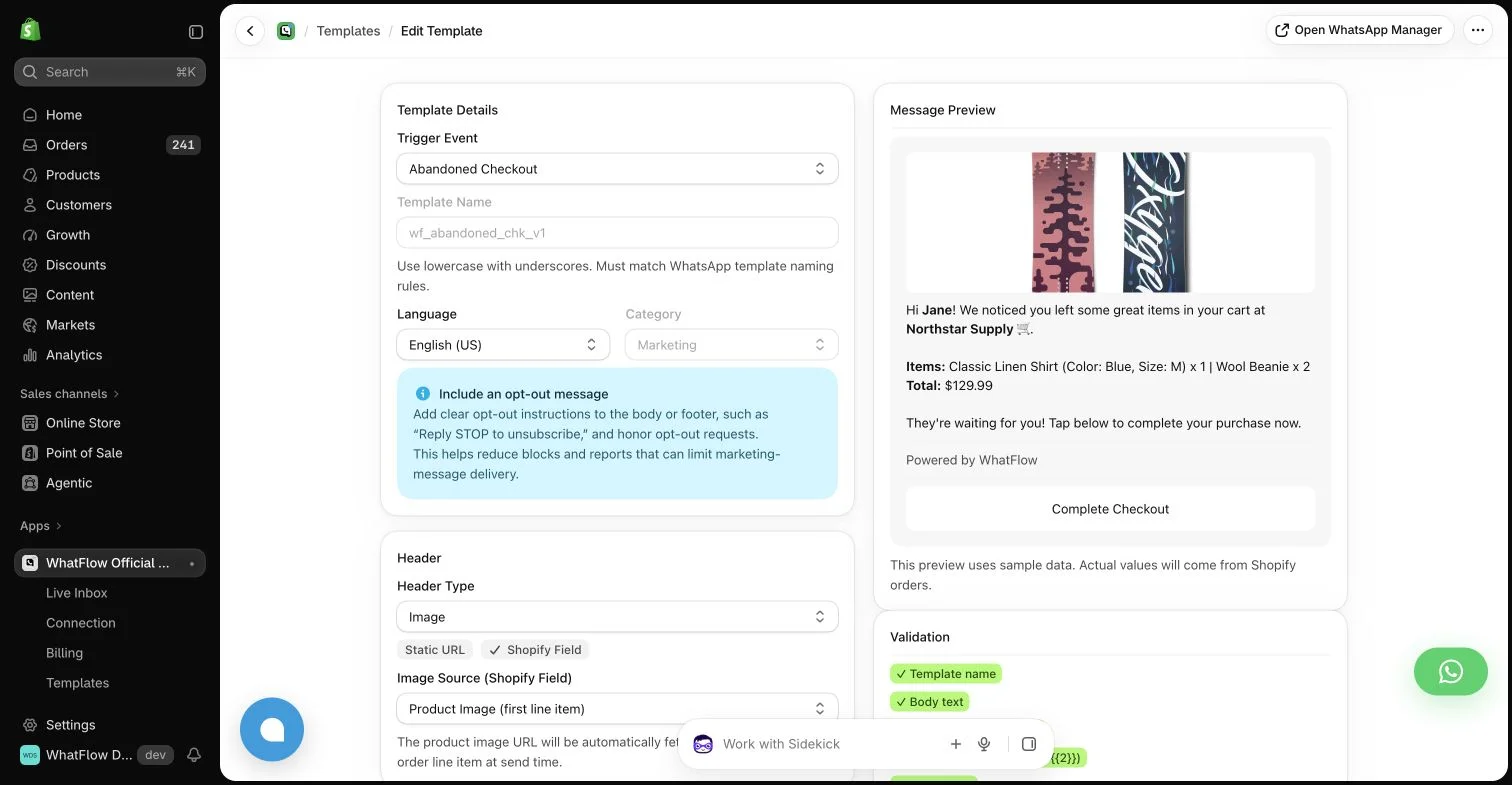
WhatFlow template editor in the demo store. Sample message data illustrates configuration, not a completed send or measured campaign outcome.
Identify the event and the useful consequence
Decide whether the message concerns points earned, a tier change or an available reward. Explain the consequence that matters to the customer rather than treating those events as interchangeable. A tier upgrade may change future benefits without creating a redeemable discount today.
Use the supported fields in the loyalty tool and check how quickly they update. If the messaging workflow cannot reliably establish the current balance, avoid presenting a stale value as live account information. Link to the appropriate account destination for the current details.
Explain the conditions near the benefit
A reward with a minimum spend, product exclusion or expiry needs clear context. Do not make the customer open several pages to discover why the promised discount does not work. A concise summary should match the maintained program terms.
Keep deadlines honest. A reminder should not imply that a reward expires tonight if it does not. If the store changes the program, update the message sequence and saved support explanations at the same time so the channels do not contradict each other.
Coordinate with the loyalty app’s existing messages
List the notifications the loyalty provider already sends. Decide which channel owns each stage and whether a WhatsApp message replaces or supplements an email. Sending the same event through several systems can feel repetitive even when each dashboard shows only one notification.
Compatible Shopify Flow tasks can support some app-to-message combinations when installed connectors expose the required data and actions. Do not claim that every loyalty app provides the same trigger or that WhatFlow can read every account field automatically.
Use the Shopify Flow overview when checking how installed app tasks exchange event data.
Keep the invitation relevant and permitted
A loyalty account does not remove the requirements for the chosen messaging channel. Check recipient preferences and use the appropriate WhatsApp format for an eligible outbound message. A friendly “you earned this” sentence is still a business message with a commercial purpose.
WhatFlow Business API can provide the WhatsApp action and the inbox for replies. Feature access is included across its plans, while allowances and rates differ. The loyalty provider continues to own the reward rules and account state.
Prepare for ordinary reward questions
Customers may ask why a balance changed, whether a reward can combine with a sale or where to redeem it. Give the team a current reference and an escalation route. Do not promise a balance correction or manual exception unless someone has actually authorized and performed it.
A shared inbox helps maintain the conversation when another colleague needs to investigate. WhatFlow does not charge inbox seat fees, but the team still needs an owner and a clear next step. Access alone does not resolve an unclear loyalty rule.
Review successful use, confused replies and failed redemption attempts alongside attributed purchases. A high click count can hide a destination where customers cannot apply the benefit they expected. Fix the explanation or integration before increasing the message volume.
A useful loyalty message makes the customer’s next choice clearer. It should help them understand a real benefit under real conditions, rather than simply create another reason for the store to interrupt them.
Trace a reward from event to redemption
Hypothetical example: a shopper reaches a higher loyalty tier, but the program does not issue a discount until a separate points threshold is met. A tier-change message should explain the actual tier benefit rather than announce a voucher. Check which fields the installed connector supplies and whether the destination account page displays the current state consistently.
Keep a short test record containing the triggering event, customer identifier, message claim and expected redemption destination. Ask a colleague to explain the benefit using only the received message. If they need hidden conditions to understand it, revise the copy. WhatFlow Business API can supply the WhatsApp action and inbox, while the loyalty provider remains responsible for balance, reward eligibility and redemption rules.
Before you put this into practice
Name the specific loyalty event behind the message.
Verify the claim against current provider data.
Test the destination and explain any minimum spend or expiry.
Explore WhatFlow Business API for WhatsApp messaging and a team inbox with no seat fees. Features are included across plans, including Free; message allowances and rates differ.
Safwan Adnan is co-founder and CEO of WhatFlow. This guide is published by WhatFlow and includes its product where relevant. Worked examples are illustrative unless a caption identifies an actual demo-store configuration; they are not merchant performance results.