Start a small-store WhatsApp marketing plan with one customer need, one defined audience and a monitored reply path. Use WhatFlow Business API for the official Meta Cloud API and template or Flow-based journeys, check message permissions and budget for the complete sequence. Pilot the process, learn from actual replies and expand only after the first journey works reliably.
Key takeaways
Start with one useful journey before building a campaign calendar.
Choose the connection method that fits the actual requirements.
Budget the sequence and prepare a real reply owner.
A small store does not need a large campaign calendar to begin using WhatsApp well. It needs one useful reason to contact the right customer and a team ready to handle the reply. Starting with several broadcasts can hide basic problems with recipient data, message purpose and ownership.
Choose a first journey that you can explain in plain language. That might be helping eligible buyers with an abandoned checkout, answering product questions or sending a relevant post-purchase invitation. The plan should describe the customer need before it describes the automation tool.
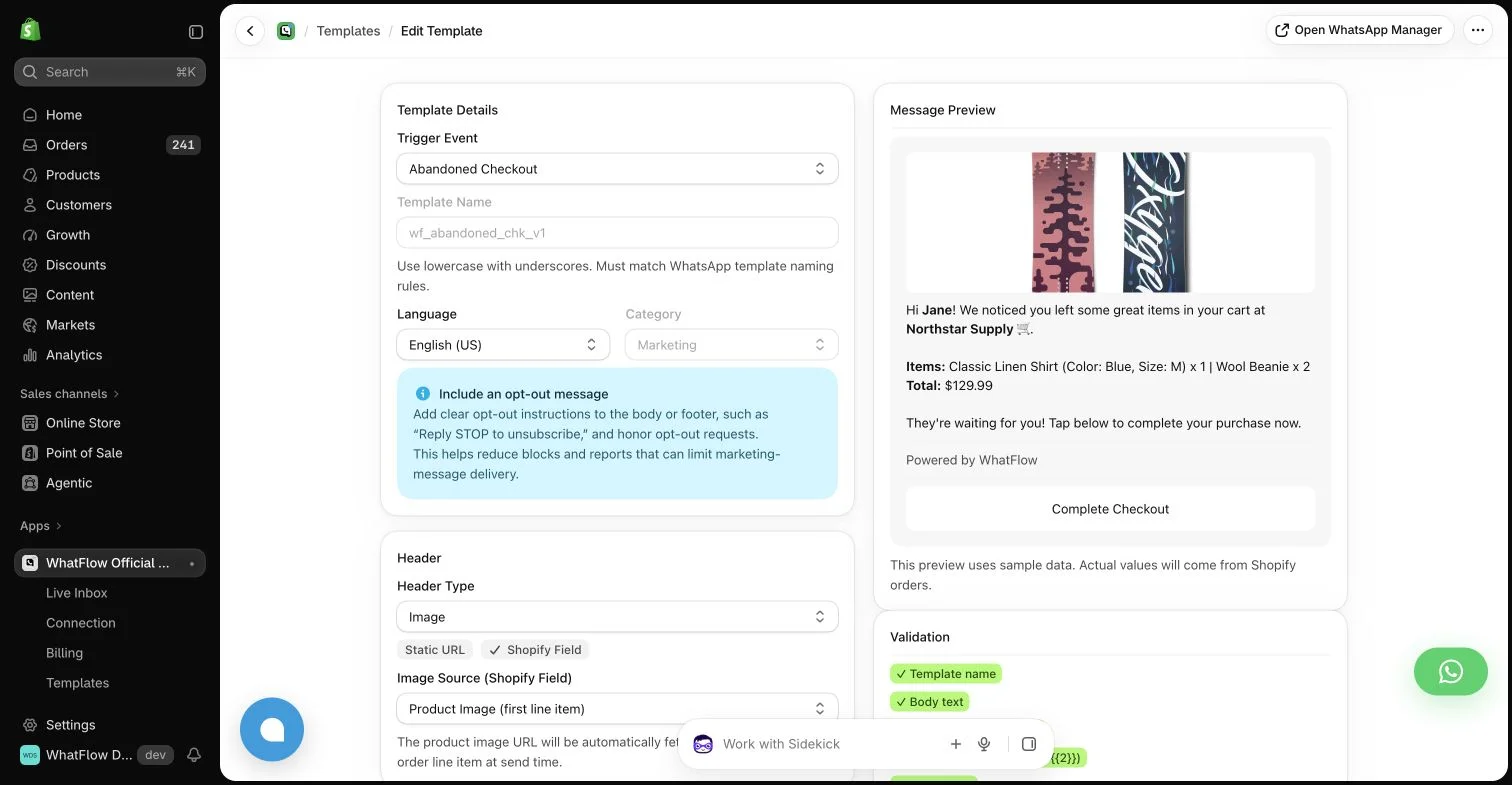
WhatFlow template editor in the demo store. Sample message data illustrates configuration, not a completed send or measured campaign outcome.
Define one outcome and one audience
Write the intended outcome and the criteria for eligibility. “Help buyers who asked about a particular product” is more precise than “increase engagement.” Check whether the tools actually provide the data needed to identify that group and whether the messaging relationship permits the planned contact.
Avoid treating every phone number in Shopify as a marketing audience. A contact field establishes that the store has a number, not that every kind of message is appropriate. Keep channel preferences and required permissions connected to the campaign decision.
WhatFlow Chat Automation uses a linked-device approach and is positioned for smaller startup workloads. WhatFlow Business API uses the official Meta Cloud API and is the relevant choice for the template and Flow-based messaging journeys discussed in this library. They should not be presented as the same connection method.
Choose based on the actual workload and requirements rather than a star-rating comparison alone. The Business API app’s supported features, message rules and commercial model should drive the plan for a growing store that needs the official platform integration.
Write the customer’s next step first
Decide whether the customer should visit a page, answer a question or choose a useful option. Then write the shortest message that gives enough context for that next step. A campaign with three unrelated offers is difficult to evaluate because it asks the recipient to make several decisions at once.
Use the required approved template where applicable. Treat example copy as a draft until the actual account setup and format are checked. Free-form customer-service messages and business-initiated templates have different constraints; a friendly writing style does not change those constraints.
Use the WhatsApp Business messaging policy to check applicable messaging permission and channel requirements; a relevant message still needs the appropriate sending process.
Plan the receiving side of the campaign
List the likely replies and the person responsible for them. A customer might ask about sizing, shipping, a previous order or how to stop messages. Prepare accurate answers and an escalation route. An invitation to reply should lead to a monitored conversation.
WhatFlow Business API includes a team inbox without seat fees, so involving a colleague does not require another inbox seat subscription. The team still needs clear responsibility and reasonable response expectations. Access to the same inbox is useful only when people know who owns the next step.
Set a budget that includes the whole journey
Estimate eligible recipients, likely sends and any planned follow-ups. Check WhatFlow allowances and rates alongside applicable WhatsApp message charges and other app costs. Do not compare subscription prices alone if one plan includes a different volume or billing basis.
Start with a small controlled test and inspect real outcomes before increasing volume. Keep a record of failed sends, customer questions and opt-outs as well as attributed purchases. A campaign that creates avoidable support work may cost more than its sending bill suggests.
Build a WhatsApp budget model that includes reminders and the relevant charging basis.
Expand from a working process
Review whether the first journey reached the intended people, gave them a relevant next step and produced a manageable conversation. Fix weak data or confusing copy before adding another audience. Keep the definitions and ownership visible so the process survives beyond the founder’s memory.
WhatFlow Business API includes features across plans, including Free, with plans differing by messaging allowances and rates. That supports starting small without paying for a higher feature tier merely to explore the tools. The next campaign should earn its place through relevance and observed results.
Put the first journey on one page
For a hypothetical store, choose one abandoned-checkout journey instead of launching recovery, reviews and win-back campaigns together. Write the intended customer benefit, qualifying event, available product context, required permissions and conditions that should stop later contact. Choose a single next step, such as answering a remaining product question, rather than combining several unrelated offers. Identify the colleague who will handle a shipping question or opt-out reply.
Before activating anything, test controlled examples and estimate the initial send plus supported follow-ups. Record what you will inspect after the pilot: correct recipients, useful replies, unresolved cases, attributed orders and actual charges. WhatFlow Business API includes all features across plans, including Free, with no inbox seat fees; allowances and rates differ. That makes it possible to begin with the required tools while keeping the expansion decision tied to demonstrated usefulness and manageable workload.
Before you put this into practice
Write the first audience and exit conditions.
Confirm the template and message permissions.
Review pilot replies and billing before expanding.
Explore WhatFlow Business API for WhatsApp messaging and a team inbox with no seat fees. Features are included across plans, including Free; message allowances and rates differ.
Safwan Adnan is co-founder and CEO of WhatFlow. This guide is published by WhatFlow and includes its product where relevant. Worked examples are illustrative unless a caption identifies an actual demo-store configuration; they are not merchant performance results.
Can I market to every phone number stored in Shopify?
No. Check the intended message, applicable permissions and channel preferences. A stored number alone does not establish eligibility for every campaign.
Which WhatFlow app do these official API workflows use?
The template and Flow journeys in this guide refer to WhatFlow Business API, which uses Meta Cloud API. Chat Automation uses a different linked-device connection method.