Build a Shopify post-purchase journey by mapping reliable order and shipment events, giving each message one useful purpose and assigning an owner to every stage. Include replies, missing events and exceptions in the design. Coordinate notifications across apps, then distinguish essential service information from later marketing that requires its own relevance, permissions and stopping rules.
Key takeaways
Map known events before writing order and delivery messages.
Give each contact a purpose and each exception an owner.
Review the complete sequence across apps and channels.
The customer experiences one store after checkout, even when five apps send the messages. An order confirmation, tracking update, review invitation and promotional offer can each be reasonable alone while forming a confusing sequence together. A post-purchase journey makes the relationship between those contacts deliberate.
Begin with the buyer’s practical questions: was the order recorded, what happens next, when should the parcel arrive and where can they get help? Marketing opportunities come after those needs are understood. A coherent sequence is easier to maintain than several disconnected campaigns.
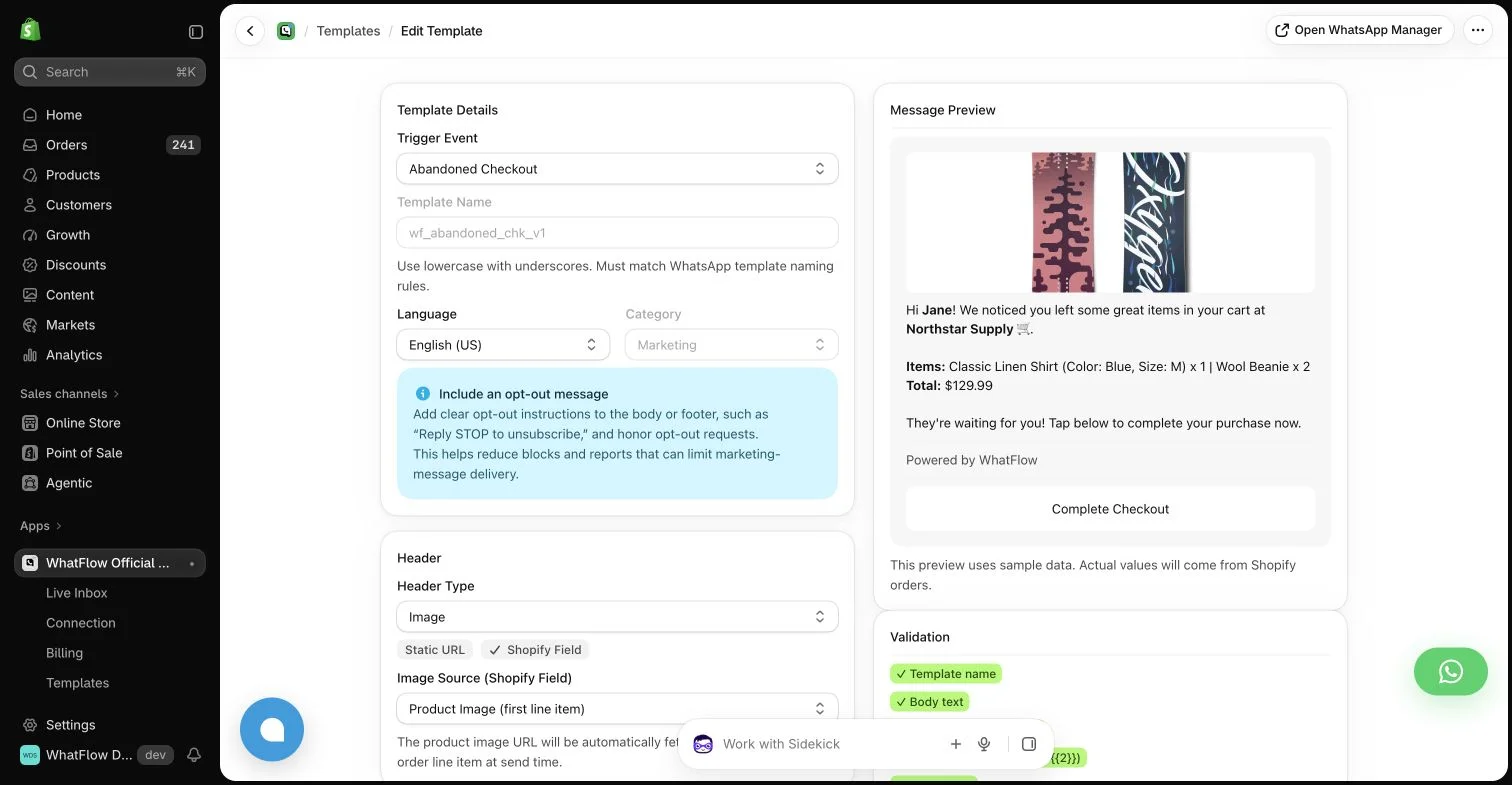
WhatFlow template editor in the demo store. Sample message data illustrates configuration, not a completed send or measured campaign outcome.
Map the events before writing the messages
List the events your systems can reliably identify, such as order creation, fulfillment and a supported delivery signal. Note which tool supplies each event and which data it provides. Do not write delivery-specific copy around an event that only establishes that the warehouse marked an order fulfilled.
Add the exceptions beside the main path. Preorders, split shipments, cancellations and replacements can change what the customer needs to hear. A workflow should not continue congratulating a buyer on their purchase while another colleague is investigating a missing parcel.
An order confirmation should make the recorded purchase understandable. A shipping message should explain the relevant shipment. A product-help message should help the buyer use the item. A review request should invite honest feedback after a reasonable opportunity to experience it.
Avoid making every contact do all four jobs. A transactional update crowded with unrelated promotions can make the essential information harder to find. Decide the role of the message first, then choose the channel and format that support that role.
Assign one owner to each stage
Write down which app owns each notification and which team member owns its exceptions. If both the review app and a WhatsApp workflow send reminders, define the combined schedule and stopping rules. Separate dashboards do not prevent the customer receiving duplicate requests.
The ownership note should include what happens when an expected event is missing. A simple staff review process can be better than a complicated automation that silently waits forever. Keep the process understandable enough that a colleague can explain why a particular message was sent.
Make replies part of the design
A buyer can answer a tracking update with a support question. That reply should reach a monitored route with enough context for someone to help. Do not promise immediate personal support if the team only checks the channel at defined times.
WhatFlow Business API can support WhatsApp messages and the shared team inbox within the Shopify workflow. Its Flow tasks can combine with compatible installed app actions when the required data exists. That composition still needs review; it is not a guarantee that every app capability is available automatically.
Respect the transition from service to marketing
A purchase does not make every future campaign relevant or permitted. Treat required messaging permissions, opt-outs and channel rules as part of the journey. WhatsApp’s free-form customer-service window and approved-template requirements still apply to the chosen message format.
A replenishment suggestion or another offer should reflect a plausible customer need and an appropriate permission basis. Keep it distinct from essential order information. The fact that a template can be selected in a tool does not establish that every recipient should receive it.
Choose a small sample of completed orders and reconstruct what the customer received across channels. Compare the sequence with support replies, product questions and any avoidable duplication. Fix a concrete mismatch before adding another touchpoint.
Track costs as well as attributed outcomes. WhatFlow’s feature access across Business API plans and lack of inbox seat fees can help a small team participate, but messaging allowances, delivery charges and other app subscriptions remain part of the full process. A useful journey earns its complexity one stage at a time.
Walk one order through five customer questions
Hypothetical example: a customer buys an item requiring setup. Map five questions: was the purchase recorded, where is the parcel, how is the item assembled, where can help be requested and when can feedback be shared? For each question, name the reliable event, message owner and destination. Keep the setup guide separate from the invitation to review the product.
Add a missing-delivery-event branch and a split-shipment branch before expanding the journey. An appropriate manual check may be sufficient when the systems cannot establish the next state. WhatFlow Business API can support WhatsApp messages and shared replies within the Shopify process, while compatible Shopify Flow tasks connect supported stages. Review one complete customer timeline across all tools before adding a repeat-purchase offer.
Before you put this into practice
List the customer question answered by each message.
Assign the event source, tool owner and exception owner.
Review split shipments and missing events across channels.
Explore WhatFlow Business API for WhatsApp messaging and a team inbox with no seat fees. Features are included across plans, including Free; message allowances and rates differ.
Safwan Adnan is co-founder and CEO of WhatFlow. This guide is published by WhatFlow and includes its product where relevant. Worked examples are illustrative unless a caption identifies an actual demo-store configuration; they are not merchant performance results.