Segment WhatsApp campaigns by a customer need that changes the message or next step, using data your store actually maintains. Write the eligibility rule, check missing values and nonmatching examples, then apply permission and opt-out requirements separately. Define exits and campaign priority so relevant groups do not create duplicate or contradictory contact across the customer journey.
Key takeaways
A useful segment changes why the message matters.
Relevance and permission are separate sending conditions.
Test exclusions and overlaps as well as matching customers.
Segmentation is useful when it changes why a message matters. A list divided into arbitrary groups is still a broad campaign if every person receives the same offer for the same reason. Start with a customer need you can support from the data your store actually has.
A buyer of a particular product may need a compatible accessory. Someone who asked a pre-purchase question may need an answer. Those are different relationships and should produce different messages, even if both contacts happen to be recent visitors to the store.
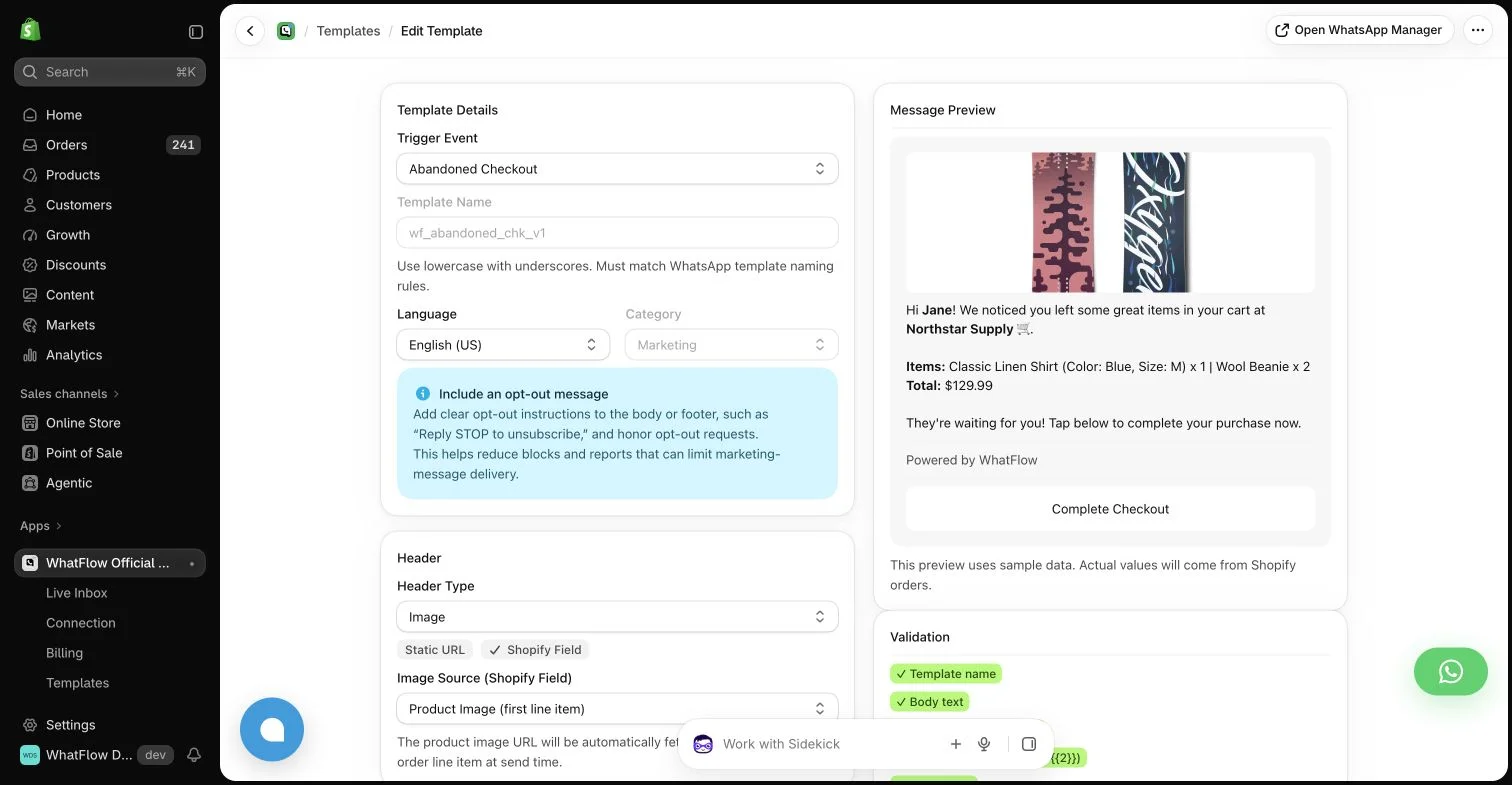
WhatFlow template editor in the demo store. Sample message data illustrates configuration, not a completed send or measured campaign outcome.
Use a criterion the team can explain
Write a plain-language audience rule before configuring filters. Include the relevant event, product context and time window. If another colleague cannot tell why someone qualifies, the rule may be too complicated or depend on information that is not consistently maintained.
Keep a distinction between observed behavior and inferred intent. A viewed product can indicate interest, but it does not prove that the person intends to buy it as a gift or needs it urgently. The message should not turn a reasonable hypothesis into an intrusive claim about the customer.
Make data quality part of eligibility
Check missing phone numbers, inconsistent country formats and outdated product mappings. An audience filter can be technically valid while supplying incomplete data to a message. Define what happens when a required value is absent rather than letting a placeholder or wrong product link reach the customer.
Test the rule with representative examples, including people who should not qualify. A positive example alone does not establish that the boundaries work. Look for overlapping groups that could receive several versions of the same campaign on the same day.
Keep commercial relevance separate from permission
A product recommendation may be relevant and still require the appropriate messaging permission. Build both conditions into the process. Do not assume that an order-related conversation gives the store unrestricted permission to send later promotional campaigns.
WhatsApp templates, the active customer-service window and opt-out handling remain part of the sending decision. WhatFlow can provide the message action and inbox, but selecting an audience does not remove the channel’s requirements or the merchant’s responsibility for the contact.
Use the WhatsApp Business messaging policy to check applicable messaging permission and channel requirements; a relevant message still needs the appropriate sending process.
Write different messages only when the reason differs
A useful segment changes the context or next step. A refill audience needs the correct replenishment destination; a compatibility audience needs the relevant specification. Simply inserting a first name into identical broad copy does not make a campaign meaningfully personalized.
Avoid overfilling the message with purchase history. The customer needs enough context to understand the recommendation, not a demonstration of every detail the store can retrieve. Use the smallest amount of accurate information that helps the current decision.
Define exits and avoid audience collisions
A purchase, opt-out or another relevant event should update eligibility where supported data is available. Decide which campaign takes priority when someone matches several groups. Without that rule, carefully defined segments can still create an overwhelming combined contact schedule.
Keep a campaign log that records the audience definition and sending window. This helps support colleagues understand why a message arrived and makes later reporting more reproducible. It also exposes cases where two apps are independently acting on the same customer event.
Compare relevant responses, purchases, costs and opt-outs under consistent attribution rules. A small group with a high percentage can still be too small for a confident conclusion. Keep counts visible and review whether the campaign reached the intended people in the first place.
WhatFlow’s features are included across Business API plans, with no inbox seat fees, so a small team can begin with a focused audience. Scale the program by improving the reason for each contact, not by multiplying filters that no one can maintain.
Test a segment with explicit counterexamples
Imagine a hypothetical campaign for a replacement filter that fits model A only. The rule might identify buyers of model A in a stated purchase period, provided the required messaging permission is established and supported exclusions are applied. Test a model B buyer, a model A buyer who recently reordered and a record with an unknown model. Each counterexample tests a different boundary; simply finding one matching customer does not establish that the segment is sound.
Write the consequence of missing data before scheduling. An unknown model should not receive a confident compatibility claim as a fallback. Decide which campaign takes priority if the same person also qualifies for a general promotion, then inspect the combined schedule. Compare relevant replies, attributed purchases and opt-outs with raw counts visible. If people mostly ask whether the filter fits, improve the product context or rule rather than creating more segments with nearly identical messages.
Explore WhatFlow Business API for WhatsApp messaging and a team inbox with no seat fees. Features are included across plans, including Free; message allowances and rates differ.
Safwan Adnan is co-founder and CEO of WhatFlow. This guide is published by WhatFlow and includes its product where relevant. Worked examples are illustrative unless a caption identifies an actual demo-store configuration; they are not merchant performance results.