A WhatsApp campaign preflight should verify the actual recipients, permissions, message template, variable mappings, links and reply process before a wider send. Test matching and nonmatching records, missing values and stopping rules with authorized controlled recipients. An accepted action or workflow preview is not confirmation that the intended customer received the right message and destination.
Key takeaways
Verify the configured send, not just a copy document.
Include negative and missing-data cases in the test.
Prepare reply ownership and supported stopping rules.
Most campaign mistakes are ordinary: a demonstration phone number remains in an action, a link opens the wrong product or a placeholder is empty. A short preflight routine can catch those problems before the store sends the message to a larger audience.
Use the same routine for each campaign, even when the copy feels familiar. A new audience, template language or product destination changes the configuration. The checklist should verify the actual send setup rather than only proofreading a separate document.
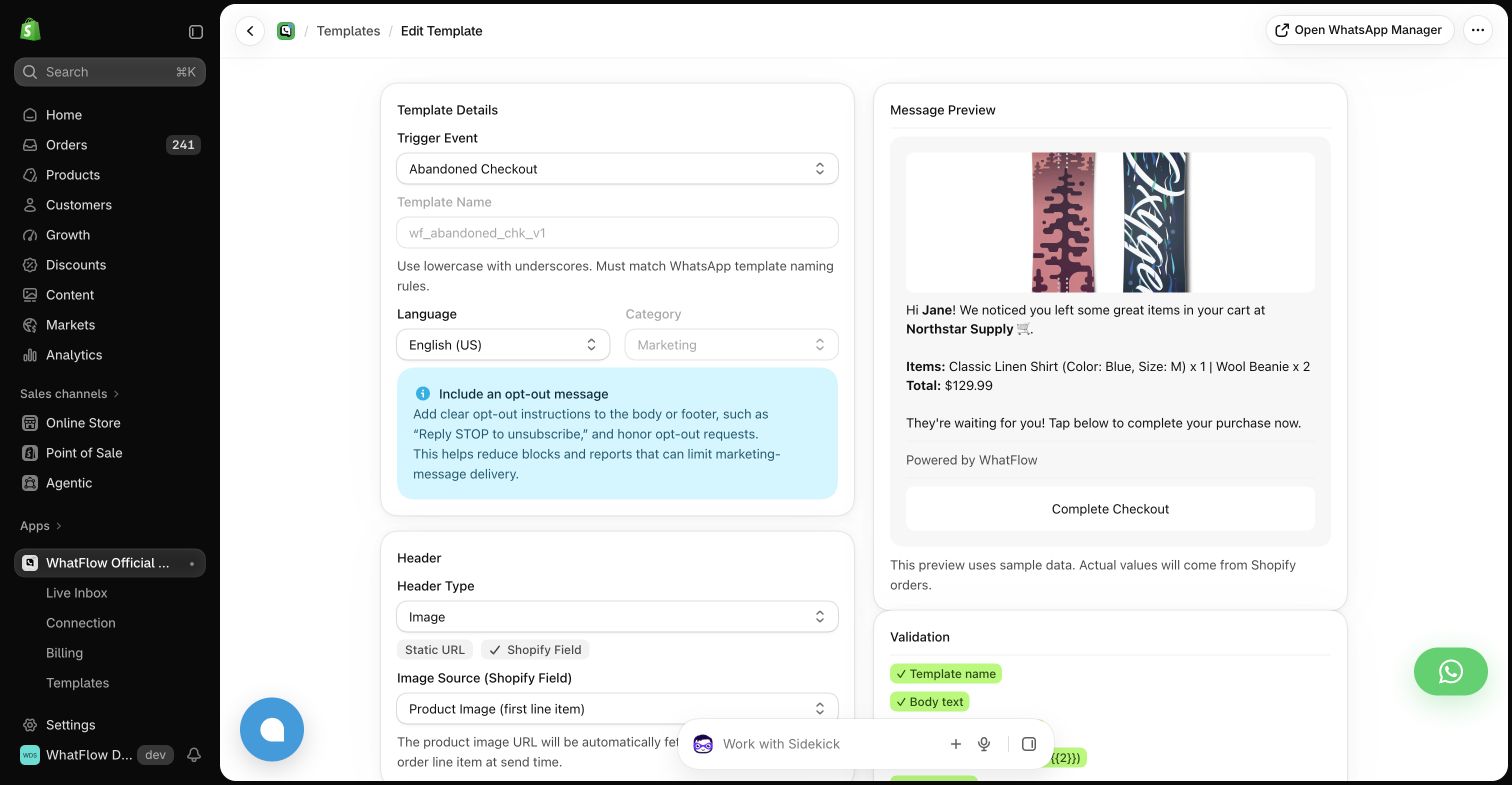
Real WhatFlow demo-store template editor. The preview uses sample data and illustrates configuration, not a completed send or a measured recovery result.
Confirm why each recipient qualifies
Review the audience rule and the required messaging relationship. Check a few matching and nonmatching examples using appropriately controlled data. A saved customer segment can change over time, so the campaign should not rely on a memory of who was in it last month.
Apply opt-outs and other defined exclusions through the supported process. Check for overlaps with campaigns in other apps. A customer can be eligible for one message while the combined contact schedule is still excessive or contradictory.
Confirm the actual template name, language and status used by the action. Match every header, body and button input to that template’s structure. A draft paragraph in a planning document is not proof that the sending tool is configured with equivalent content.
Use the appropriate message format for the situation. Free-form text and other customer-service formats have different constraints from approved templates. Do not try to resolve a format problem by assuming a friendly tone makes a business-initiated message unrestricted.
Inspect variable values at the edges
Test a long product name, a missing first name and an order with several items where those cases are relevant. Decide what the message should do when required data is absent. Avoid sending raw placeholders or unrelated fallback values merely to satisfy a required field.
Check the recipient mapping especially carefully. A number typed during a demo should not become the destination for every event. Confirm international formatting or the supported country-code input using your actual tool configuration, rather than inferring the country from the customer’s name.
Use the WhatsApp Business messaging policy to check applicable messaging permission and channel requirements; a relevant message still needs the appropriate sending process.
Follow every link on a phone
Open the final destination and confirm the product, offer, language and relevant conditions. Check stock and whether a customer outside the primary market can complete the intended next step. A valid URL can still lead to an irrelevant or unavailable experience.
Review any deadline, discount and shipping claim against the current store rules. Do not leave a test coupon or an outdated promotion in the approved copy. If the destination changes after scheduling, revisit the message before the send rather than assuming the link itself is enough.
Prepare the reply path and stopping rules
Tell the receiving team what was sent, who received it and what the offer actually includes. Define the owner for questions, complaints and opt-outs. A campaign that invites replies should not land in an inbox no one expects to monitor.
WhatFlow’s team inbox and Shopify integration can support the conversation, with no inbox seat fees on Business API plans. The merchant still needs an operational plan. Review how a purchase or other goal stops later reminders where the available data supports that behavior.
Start with a controlled send and inspect the result
Use authorized test recipients and a small appropriate pilot before increasing volume. Check the actual message, variable mapping and destination. A workflow preview or accepted send request is not the same as verified delivery to the intended customer.
Record the campaign version, date, audience definition and any issues found. That makes the next preflight faster and gives the team useful context if a customer asks about the message later. A dependable routine is more valuable than relying on one person to remember every possible mistake.
Test the boundaries rather than one perfect record
Use a small fictional test matrix before selecting authorized test recipients. Include a complete eligible record, an opted-out contact, a missing-name case, a recently purchased customer who should exit the sequence and a record with several products. Write whether each should send, stop or require review. The expected result must follow the actual workflow; do not assume a filter or fallback exists simply because the test plan needs it.
Inspect the configured destination number and final rendered message for each applicable test. Open every link on a phone and check the real template language, product and offer conditions. If an exclusion fails, correct the audience or narrow the pilot before increasing volume. Share the final campaign context with the person watching WhatFlow replies, including where the team should escalate a question. Keep the tested version and sending window in the campaign record.
Before you put this into practice
Confirm the actual recipient mapping.
Test opted-out and already-purchased records.
Inspect the delivered message and every phone destination.
Explore WhatFlow Business API for WhatsApp messaging and a team inbox with no seat fees. Features are included across plans, including Free; message allowances and rates differ.
Safwan Adnan is co-founder and CEO of WhatFlow. This guide is published by WhatFlow and includes its product where relevant. Worked examples are illustrative unless a caption identifies an actual demo-store configuration; they are not merchant performance results.