Choose a first Shopify automation that removes one repeated handoff, starts from reliable data and produces an outcome the team can inspect. Keep the action modest, such as applying a meaningful tag, and define what happens when fields are missing or events repeat. Document an owner before adding further branches or consequential order actions.
Key takeaways
Start with one repeated manual decision and one outcome.
Choose a trigger that supplies the record the action needs.
Include missing data and repeated events in the first review.
The first automation should make the team’s work easier to understand, not harder to explain. A visually impressive workflow with many branches can still be a poor starting point if no one knows what should happen when a field is missing or a customer replies unexpectedly.
Look for a task that repeats, has a clear business rule and creates an outcome you can verify. A simple order tag or a well-defined message can teach the team more than an ambitious sequence that combines several unresolved decisions.
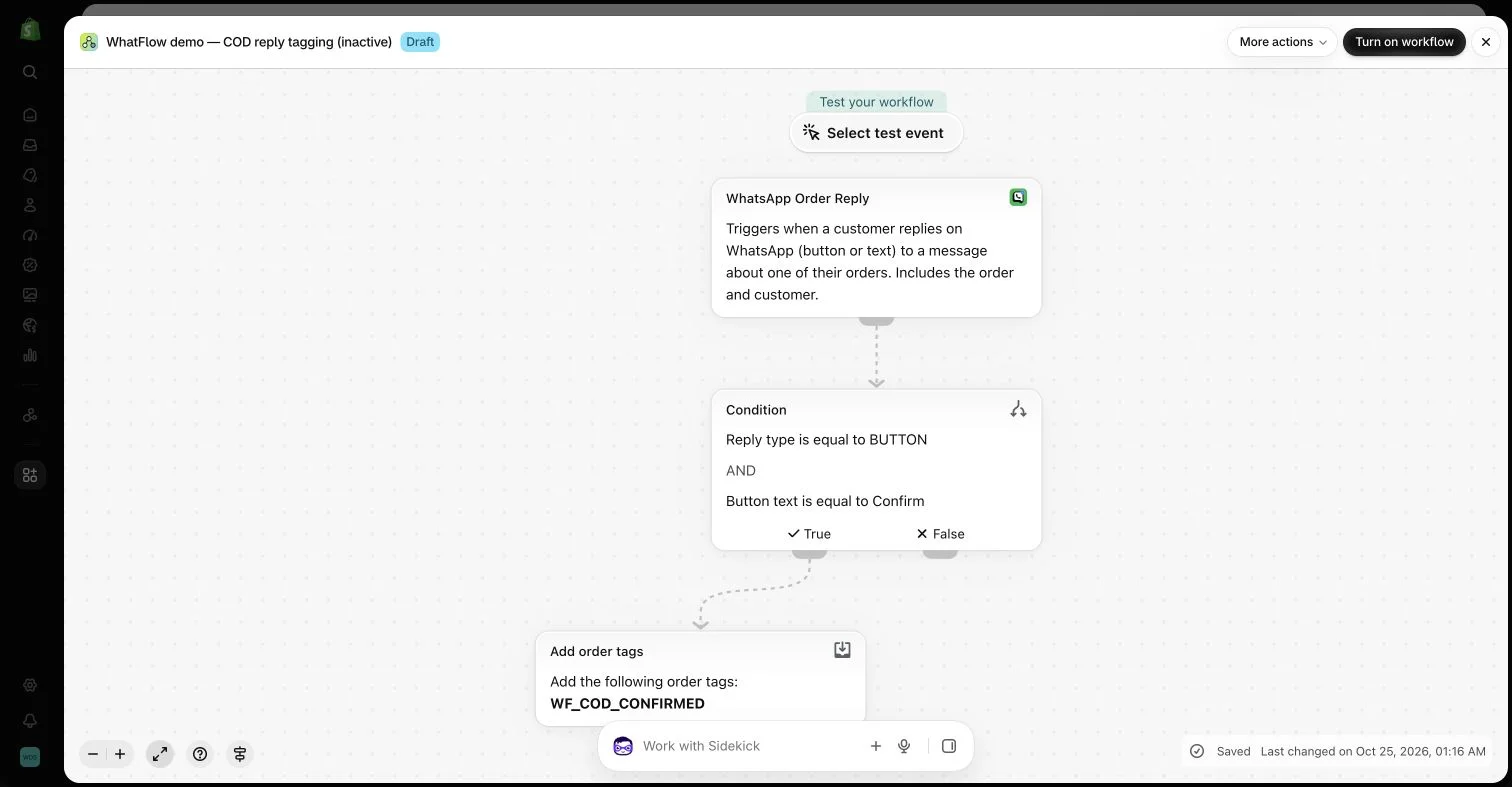
An inactive workflow in the WhatFlow demo store illustrates order-reply configuration. No customer messages or order changes were made.
Find the repeated handoff
Ask which task regularly requires someone to copy information between tools or tell another colleague that something happened. A customer confirming an order, a review-request event or a specific support keyword can each represent a potential starting point.
Choose one handoff with enough repetition to be worth improving. Avoid automating an unusual exception before the normal process is understood. The team should be able to describe the current manual decision and the evidence it uses.
Check that the trigger provides the right data
A trigger determines what the workflow knows at the start. An incoming phone number is not automatically a Shopify order reference. If the next action needs an order, choose a supported event that supplies that context and verify which record it identifies.
WhatFlow’s order-reply trigger is distinct from its generic button-click event for this reason. Select the event that fits the task rather than the label that sounds most familiar. Missing context is a design problem, not a detail to hide with a guessed value.
A workflow that records a clearly understood tag is easier to inspect than one that also cancels, refunds or fulfills an order. Start with the smallest action that removes a useful manual step. Treat higher-impact operations as separate business decisions with explicit rules.
Write down what the workflow should not infer. A customer clicking a confirmation button does not necessarily authorize every later operation the store might associate with that order. Keep the message wording and resulting action consistent.
Design the exception path early
List missing data, duplicate events, late replies and nonmatching responses. Decide whether those cases should stop, remain for a person or take another supported action. The false branch is part of the process, not empty space to fill after the main path looks complete.
Assign ownership of the exceptions. WhatFlow’s team inbox can support the human conversation, while compatible Flow tasks can connect to other installed apps where supported. Do not promise automatic ticket creation or assignment unless the actual configured action performs it.
Use the platform’s available testing tools to inspect logic and variable mapping. Keep example workflows inactive during review. A configuration preview does not prove that a message was delivered or that an external operation occurred.
For any later end-to-end check, use controlled data and an appropriate authorization process. Include a nonmatching case and a repeated event, not only the ideal positive path. The result should be observable in the target system rather than inferred from a plausible diagram.
Leave a note the next colleague can use
Name the workflow around its outcome and document the trigger, required data, owner and exception behavior. Include the reason for important conditions. A colleague should not need the original builder’s memory to understand why the flow exists.
WhatFlow Business API includes features across plans with no inbox seat fees, which can help a small team explore a focused workflow. The value comes from a maintained process with clear inputs and outcomes. Add complexity only when the next branch solves a defined problem.
Write the rule before drawing the workflow
Hypothetical example: the team manually marks an order after a customer confirms it through an order-related WhatsApp reply. Write the rule as: when the supported order-reply event supplies an order reference and the reply matches the confirmation choice, add the agreed order tag. Leave cancellation and fulfillment outside this first task because they require separate business rules.
Review four cases: matching reply, nonmatching reply, missing order context and repeated event. Record the expected outcome for each before inspecting the configured Shopify Flow steps. WhatFlow Business API’s order-reply event is useful when that order context is required. If the workflow cannot identify the intended order, send the case to review rather than substituting a generic phone-number match.
Before you put this into practice
State the rule in one sentence before configuring steps.
Inspect the trigger’s actual order context.
Document the expected result for repeated and nonmatching events.
Explore WhatFlow Business API for WhatsApp messaging and a team inbox with no seat fees. Features are included across plans, including Free; message allowances and rates differ.
Safwan Adnan is co-founder and CEO of WhatFlow. This guide is published by WhatFlow and includes its product where relevant. Worked examples are illustrative unless a caption identifies an actual demo-store configuration; they are not merchant performance results.