Recover an abandoned Shopify checkout by confirming the checkout event, contacting an eligible customer with the appropriate WhatsApp message format, and asking what prevented the purchase. Offer help for the stated obstacle, then stop follow-ups after purchase or opt-out. Measure useful replies, attributable orders and costs together rather than treating every recovered order as incremental revenue.
Key takeaways
Use checkout context rather than treating a product view as an abandoned order.
Resolve sizing, delivery or payment uncertainty before offering a discount.
Coordinate purchase and opt-out exits across every recovery channel.
An abandoned checkout does not always mean the buyer needs a discount. They may have been interrupted, encountered a payment problem or noticed that a delivery promise was unclear. A useful follow-up gives them a way to resolve the obstacle rather than assuming the price was wrong.
Build checkout recovery around the customer’s actual journey. Use supported checkout data, appropriate messaging permission and a clear rule for stopping after purchase or opt-out. A message that ignores a completed order can undo the reassurance the follow-up was intended to provide.
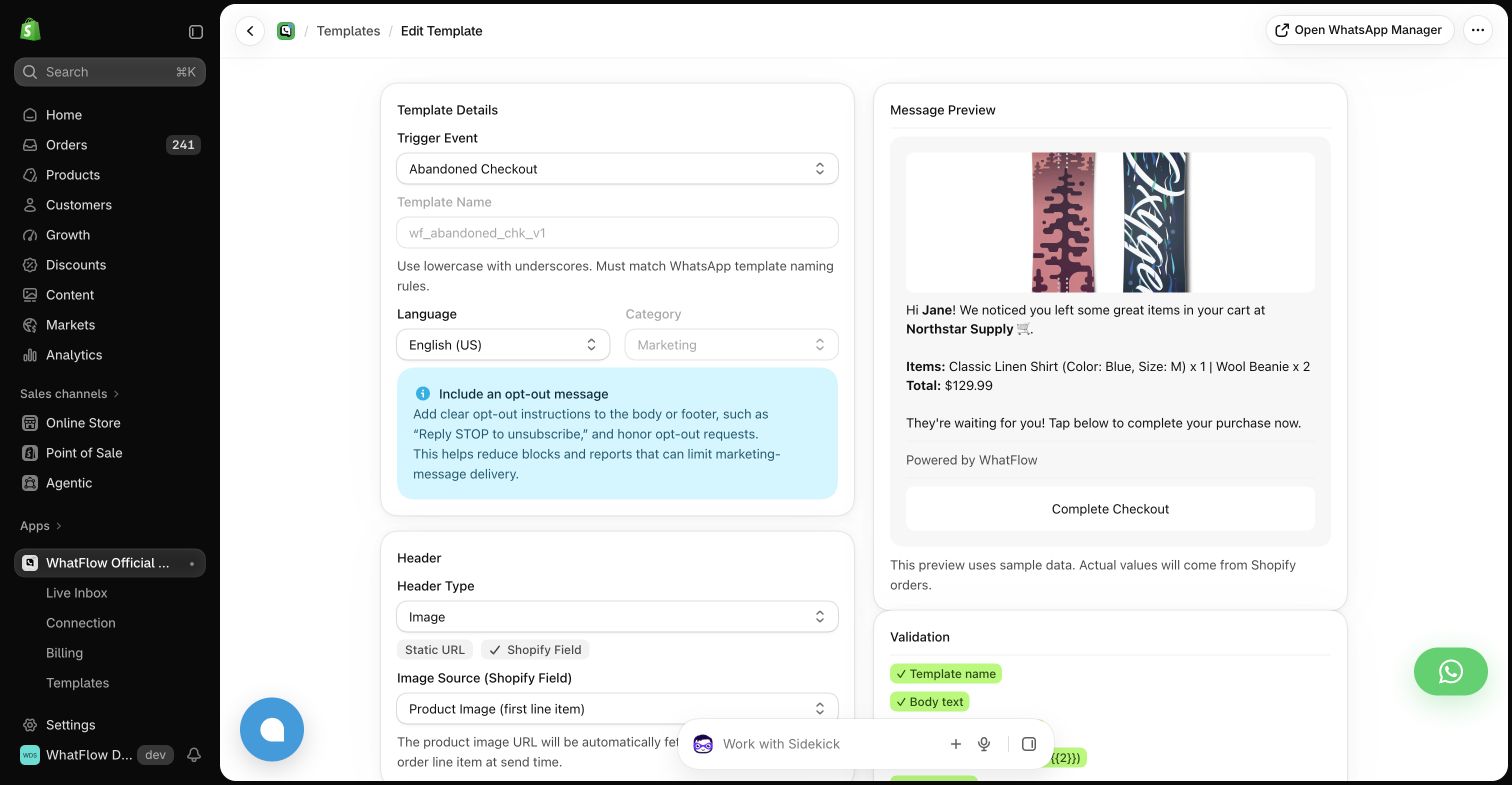
Real WhatFlow demo-store template editor. The preview uses sample data and illustrates configuration, not a completed send or a measured recovery result.
Establish what the customer left behind
Check which event or audience your tool actually uses. A product-page visit, a cart and an abandoned checkout provide different levels of context. Do not describe a product as waiting in a completed checkout if the customer only viewed it, and do not assume you have their contact details.
When a recovery link is available, test that it takes the intended recipient to the appropriate destination. Inventory, prices and shipping eligibility can change after the original session. Avoid promising that the checkout is unchanged unless the current system actually supports that assurance.
Ask a question that gives the buyer a reason to reply
A practical draft could be: “Did anything stop you from completing your order? Reply if you need help with sizing, delivery or checkout.” Use the required approved message format for an eligible outbound WhatsApp contact. This wording is an example, not a pre-approved template.
Keep the first message focused. A long list of product benefits, several links and an immediate discount can make a helpful follow-up feel like a broadcast. If the customer asks about delivery, answer that question before moving to a separate promotional argument.
A sizing question may need a measurement or a comparison between variants. A payment question may need a supported checkout route. A shipping question may need the buyer’s destination and an accurate explanation of the available options. Give the team concise resources for common answers.
Avoid collecting payment-card details in the chat. Direct the buyer to the appropriate checkout process. If the team cannot establish why a payment failed, say what can be checked rather than presenting a guess as an account-specific diagnosis.
Coordinate recovery across apps
List the email, SMS and WhatsApp follow-ups already configured for the same checkout. Decide which system owns each stage and how a completed purchase suppresses further contact where supported. The customer sees the combined sequence, even if each app reports only its own messages.
WhatFlow Business API can provide WhatsApp automation and the team inbox for replies. The workflow still needs accurate event mapping and an appropriate recipient. Review the first controlled examples instead of assuming that installing another app automatically creates a coordinated recovery journey.
A discount can be appropriate, but it should solve a defined commercial problem. Check margin, eligibility and how the offer interacts with existing promotions. Do not write a unique personal offer if the same code is publicly available to everyone, and do not invent an expiry to create urgency.
Try improving the information before training the sequence to discount immediately. If the underlying obstacle is an unclear return policy, a coupon may produce an order while leaving the same uncertainty unresolved. That can reappear later as a support request or a return.
Evaluate the whole result
Measure attributed purchases using your tool’s supported method, alongside message costs, discounts, refunds and customer replies. A recovery dashboard does not necessarily prove that every attributed order would otherwise have been lost. Keep the attribution window and limitations visible.
The useful outcome is a relevant conversation that helps a buyer complete a decision. WhatFlow’s included features and lack of inbox seat fees can make it easier for a small team to handle that conversation, while message allowances and delivery charges remain part of the budget.
A delivery question recovery example
Hypothetical example: a homeware buyer leaves checkout after viewing delivery options. An eligible recovery message asks whether they need help, and the buyer replies that they cannot tell whether the parcel will arrive before a move. The colleague checks the destination and current shipping options before answering; a coupon would not resolve that uncertainty.
Record the obstacle as delivery information, the answer supplied and whether the buyer later orders within your stated attribution window. Review similar replies before changing the sequence. If the same destination question repeats, improve the public shipping explanation. WhatFlow Business API can keep the WhatsApp reply with the team while the store fixes the underlying information gap.
Before you put this into practice
Verify the checkout record and recovery destination.
Test purchase suppression before the next reminder.
Assign delivery and payment questions to an inbox owner.
Explore WhatFlow Business API for WhatsApp messaging and a team inbox with no seat fees. Features are included across plans, including Free; message allowances and rates differ.
Safwan Adnan is co-founder and CEO of WhatFlow. This guide is published by WhatFlow and includes its product where relevant. Worked examples are illustrative unless a caption identifies an actual demo-store configuration; they are not merchant performance results.