Reduce avoidable cart abandonment by making the purchase understandable before checkout: show meaningful variant details, explain cost conditions, summarize delivery and returns accurately, and keep help accessible. Walk the mobile journey as a new buyer and fix repeated information gaps. Recovery messages can address remaining hesitation, but they should not compensate indefinitely for unclear product or cart information.
Key takeaways
Explain the purchase before asking shoppers to recover it.
Test variant and cost information through the mobile cart.
Measure specific questions alongside purchase outcomes.
A cart-recovery sequence starts after a customer has hesitated. It is also worth asking whether the store could have prevented that uncertainty earlier. If delivery costs, compatibility or return conditions are difficult to find, the follow-up may repeatedly answer a question the product page should already address.
This is an information audit rather than a promise that every abandoned cart is recoverable. Some shoppers are comparing options or saving an idea for later. Focus first on the obstacles the store can explain or remove without pressuring the customer.
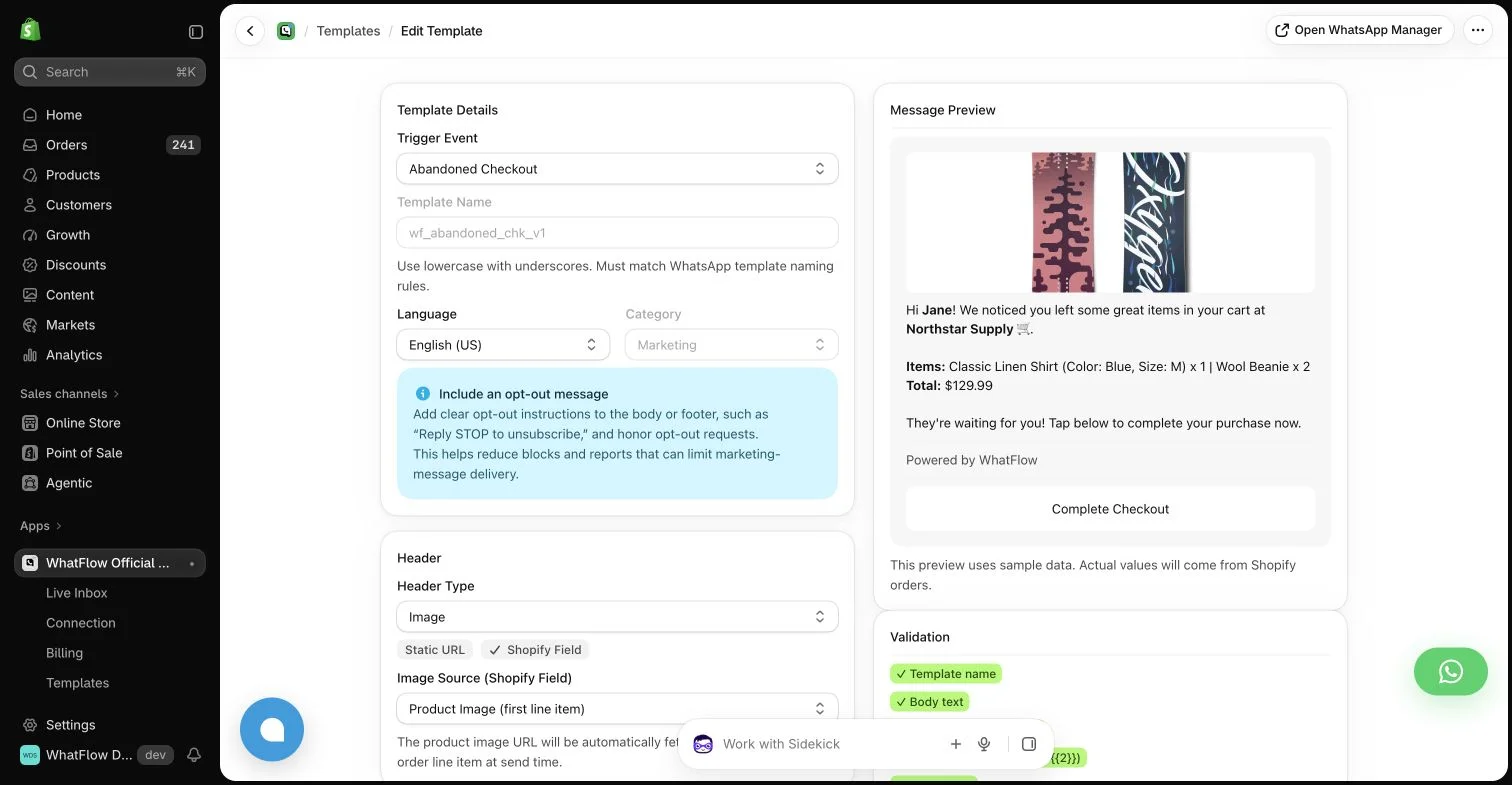
WhatFlow template editor in the demo store. Sample message data illustrates configuration, not a completed send or measured campaign outcome.
Walk through the purchase with a fresh question
Choose a representative product and pretend you are buying it for the first time. Can you tell which variant fits your needs, what is included and whether another item is required? Open the cart on a phone and check whether those choices remain understandable after the product page is gone.
Ask someone unfamiliar with the store to repeat the exercise if possible. Have them describe what they expect to happen next. Their uncertainty is more useful than a general opinion that the design looks nice, especially when it exposes a detail the team takes for granted.
Identify when the buyer first sees shipping, taxes or other applicable costs in your actual checkout. Where the final amount depends on the destination, explain that dependency instead of displaying a broad promise the checkout may contradict. Keep promotional shipping claims aligned with the real eligibility rules.
A banner saying “free shipping” needs nearby context when a threshold or regional restriction applies. The goal is not to fit the full policy into the cart. It is to make the next step predictable enough that the customer does not feel the offer changed midway through the purchase.
Make quantity and variant corrections straightforward
A shopper should be able to understand what they added and correct an obvious mistake. Test long variant names, multiple sizes and a quantity change on a small screen. An unfamiliar abbreviation can be confusing when it is the only visible description of the selected item.
Review the empty and error states too. A stock change should explain what needs attention rather than leaving the purchase button apparently unresponsive. Use the capabilities your theme and checkout support; do not promise a custom behavior without checking the current store configuration.
Relevant product reviews can answer fit and use questions before the buyer reaches the cart. A concise policy summary can clarify an operational concern. A customer-help entry point can cover the remaining exception, provided the team can actually respond through that route.
WhatFlow’s theme-fitting WhatsApp buttons can provide an accessible path to a conversation. Place the button so it does not cover the cart’s main action, discounts or error messages. Test the combined effect of other floating tools rather than evaluating each widget in isolation.
Inspect the combined mobile widget layout so reassurance does not cover the purchase controls.
Turn support questions into page improvements
Tag or summarize recurring pre-purchase questions without spreading private details across several tools. If many customers ask whether an item fits a particular device, improve the compatibility information. If they ask about international delivery, make the available destinations easier to establish.
A short weekly review can connect those themes to a specific page change. Give the change an owner and record when it went live. Otherwise the inbox becomes an efficient way to repeat an answer indefinitely while the same avoidable hesitation continues for new visitors.
Measure one change at a time
Compare relevant journey measures before and after the improvement using a consistent period and audience. Keep seasonal promotions, traffic-source changes and stock problems in mind. A higher conversion percentage can come from a different mix of visitors rather than the cart edit alone.
Use recovery messages for the situations that remain, with appropriate permissions and stopping rules. A store that explains the purchase clearly can make those conversations more focused. The result is less guesswork for the buyer and more useful information for the team handling the exceptions.
Follow one uncertain purchase from page to cart
Imagine buying a replacement filter for a particular appliance. Start at the product link on a phone and write down the exact model the page says it fits. Add the item, then check whether the cart still identifies that model and pack quantity. Continue far enough to see when shipping conditions become clear. Record each point where you would need to leave the journey to find a basic answer.
Choose the first uncertainty the store can verify and correct, such as replacing an internal variant code with a readable model label. Keep price, offer and other page elements stable while observing the change where practical. Review related support questions alongside the available cart and checkout measures. A lower question count is useful context, but a different traffic mix or stock position can also affect purchases; write those conditions beside any before-and-after comparison.
Explore WhatFlow Business API for WhatsApp messaging and a team inbox with no seat fees. Features are included across plans, including Free; message allowances and rates differ.
Safwan Adnan is co-founder and CEO of WhatFlow. This guide is published by WhatFlow and includes its product where relevant. Worked examples are illustrative unless a caption identifies an actual demo-store configuration; they are not merchant performance results.