Make a Shopify cross-sell useful by recommending an item with a verified relationship to the customer’s purchase and explaining why it helps. Distinguish essential components from optional convenience, choose a sensible moment and check the destination. Evaluate additional margin alongside returns and confused replies so a larger basket does not hide an unsuitable recommendation.
Key takeaways
Verify compatibility for the actual product version.
Explain whether an accessory is necessary or optional.
Review returns and support questions alongside additional margin.
A cross-sell is useful when the additional item helps the buyer complete the job they came to do. It is less useful when the store simply places another popular product beside every order. Start with the relationship between the items, not the desire to increase the basket total.
A compatible refill, a genuinely needed adapter or an optional care accessory can each serve a clear purpose. The recommendation should explain that purpose and make the choice understandable. It should not imply that an optional product is required to use the original purchase.
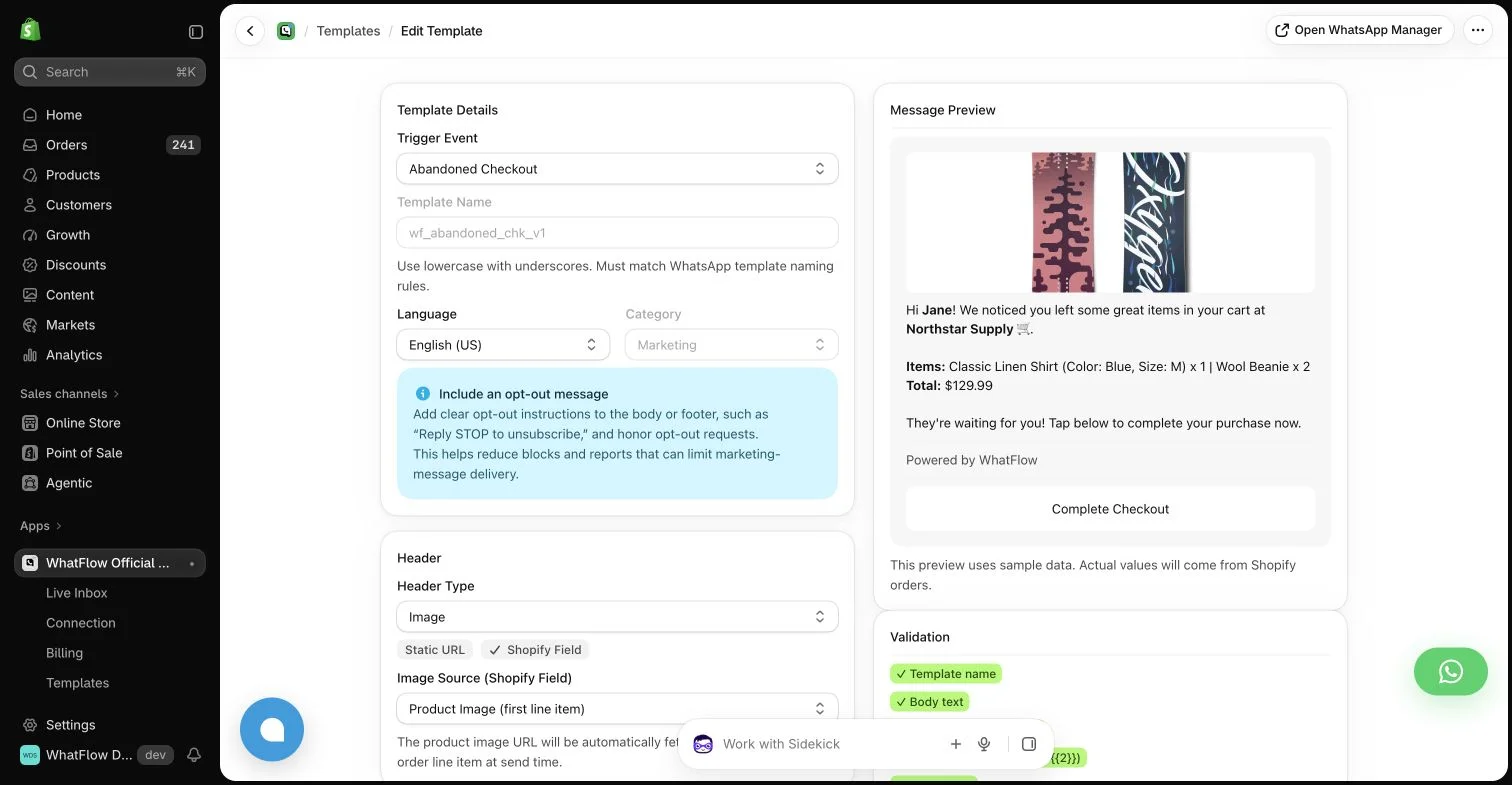
WhatFlow template editor in the demo store. Sample message data illustrates configuration, not a completed send or measured campaign outcome.
Verify the relationship between the products
Check versions, dimensions, materials and other relevant compatibility information. Similar names or shared tags are not enough. An accessory that fits one generation of a product may be unsuitable for another.
Document the mapping in a place the team can maintain. If compatibility changes, update the recommendation and the support explanation. Do not rely on a dynamic app rule that no one can explain or verify against the current catalog.
Distinguish required and optional items
If a customer needs another component for the intended use, explain that clearly before purchase. Do not present an essential requirement as a surprise upsell after the order is complete. If the item is optional, say what additional convenience it provides without creating a false dependency.
A useful product page can answer these questions directly. Customer reviews may illustrate everyday use, but they do not replace a verified specification. Keep the recommendation’s factual claim tied to information the store can substantiate.
A product-page recommendation can help someone assemble the right purchase. A later message can be useful when the buyer has had time to use the item. Those are different contexts and may justify different wording or no recommendation at all.
Avoid crowding every transactional update with another offer. An order problem should receive a service response before a new sales pitch. Use available operational data and a clear policy rather than assuming every recent customer is ready for another purchase.
Follow the link and confirm the recommended item is available in the relevant market. Check variant selection and any bundle conditions. A recommendation that opens the wrong size or an unavailable product adds uncertainty instead of value.
If a discount is involved, explain the actual conditions and expiry. Do not invent urgency or imply a personal exception when the offer is broadly available. The customer should find the same arrangement at checkout that the message described.
Support questions through a real conversation
A buyer may ask whether the recommendation suits their existing item. Give the team access to the compatibility source and a clear way to escalate an unusual case. An honest “we need to check that version” is more useful than a confident guess.
WhatFlow can provide an appropriate WhatsApp message and the shared inbox for replies. The required permissions and message format still apply to outbound offers. Its no-seat-fee inbox model can help involve a colleague, but the store remains responsible for the recommendation’s accuracy.
Evaluate customer value and commercial value together
Review the additional margin alongside returns, complaints and support questions. A larger basket is not automatically a better outcome if the extra product was unsuitable or the customer misunderstood why it was recommended.
Use the result to improve the relationship between products and the explanation of the choice. A helpful cross-sell should make the original purchase more useful, not make the buyer wonder why the store kept asking them to add something unrelated.
Use a compatibility map before writing the offer
Hypothetical example: a store sells two dispenser generations and their refill packs. Build a simple map from each dispenser version to its supported refill, then check the destination variant in the recommendation. The message should explain which version it suits and how the buyer can confirm their model. Do not infer compatibility from the shared product name alone.
Keep an owner for the map and review it whenever the catalog changes. If the buyer asks about an unknown version, pause the recommendation until someone can check it. WhatFlow Business API can provide the eligible WhatsApp message and shared reply route. Review sales of the recommended refill alongside compatibility questions and returns before extending the same rule to another product family.
Explore WhatFlow Business API for WhatsApp messaging and a team inbox with no seat fees. Features are included across plans, including Free; message allowances and rates differ.
Safwan Adnan is co-founder and CEO of WhatFlow. This guide is published by WhatFlow and includes its product where relevant. Worked examples are illustrative unless a caption identifies an actual demo-store configuration; they are not merchant performance results.