Keep product variant reviews tied to the item and version the customer actually reviewed. Explain meaningful differences in size, capacity or compatibility, and use only associations supported by the source records and review provider. A shared rating count should help shoppers explore relevant experience without implying that every review describes the exact variant they selected.
Key takeaways
Group reviews around legitimate product relationships.
Never invent missing variant or version associations.
Test whether mobile readers can interpret the review source.
A review saying “it fits perfectly” is less useful when the reader cannot tell which size or version the customer bought. Variant context helps a shopper interpret the experience. A combined review count can be convenient, but it should not erase differences that matter to the purchase.
Start by identifying which variations change the product’s use. Color may affect appearance, size may affect fit and a new version may change compatibility. The review display should help the buyer understand those distinctions rather than treat every item as interchangeable evidence.
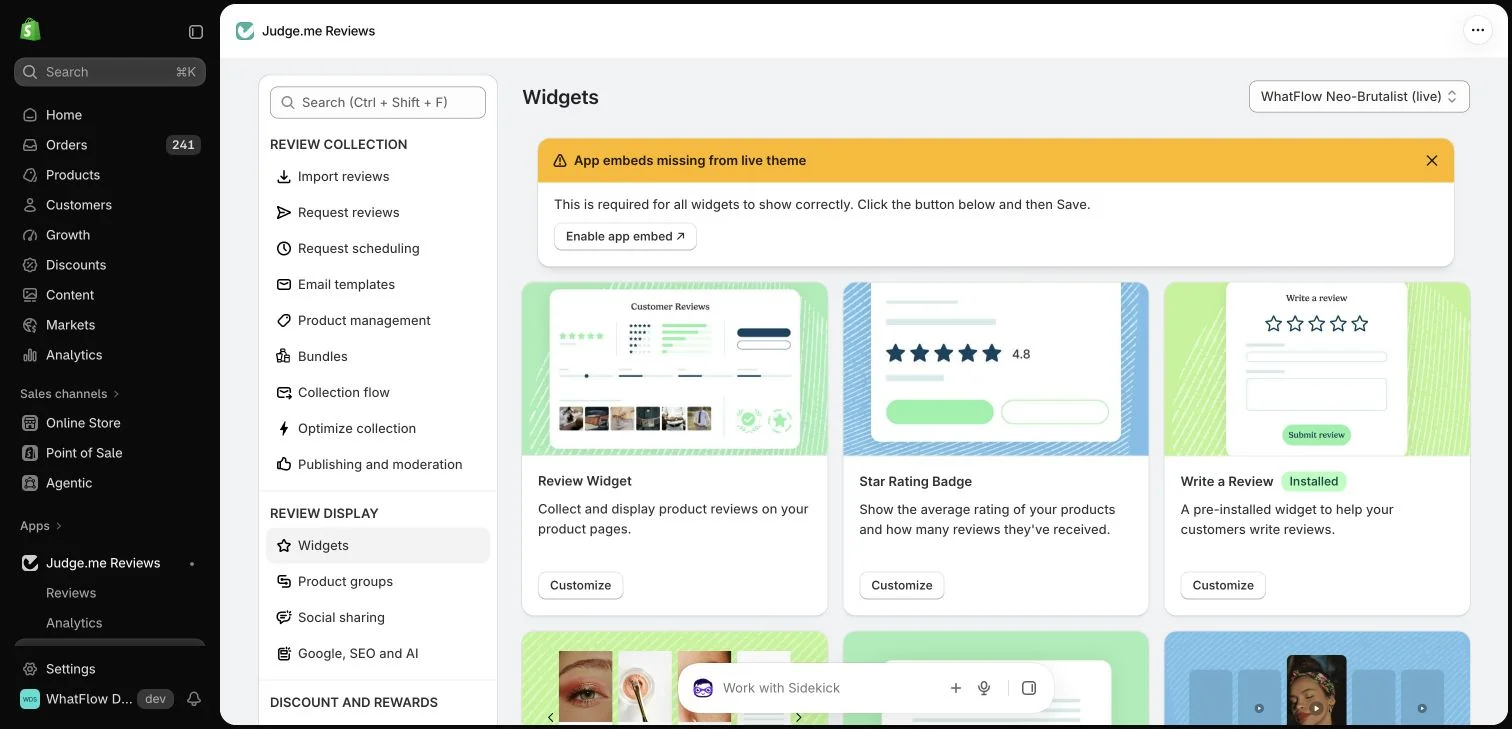
Judge.me widget configuration in the WhatFlow demo store. This setup view has no live theme embed enabled; ratings in the widget cards are interface examples.
Decide which differences are meaningful
List the characteristics that affect suitability. A storage bag in two capacities may need context about what fits inside. A revised electronic accessory may have compatibility differences even if the product name remains similar. Use verified specifications to establish the distinction.
Do not assume the review app can infer this meaning from a variant label alone. The merchant needs a clear product structure and supported association data. A technically combined widget can still require explanatory copy so the customer understands what they are reading.
Check what the review provider actually stores
Consult the current provider’s capabilities for variant information, product grouping and display. Review whether the original submission is associated with the relevant item and what context survives an import or product change. Settings and plan availability can differ.
Avoid manually relabelling a review as a particular variant when the source does not establish that connection. If the context is unavailable, do not invent it. A clear limitation is more useful than a precise-looking label based on a guess.
Group products for a reason the shopper can understand
A grouping should reflect a legitimate relationship, not simply a desire for more visible stars. Materially different products should not borrow each other’s feedback in a way that suggests the review concerns the exact item being considered.
If the provider supports a grouped display, check its labels and filtering on mobile. The shopper should be able to distinguish the source product where that distinction matters. A correct total count is only one part of an understandable review experience.
Consult the Judge.me widget reference for supported widget types and storefront placements, then inspect what your configured page actually displays.
Keep product versions and changes visible
When a product changes significantly, decide how earlier feedback will be presented fairly. A complaint about an old component may still be legitimate historical feedback. A review praising a removed feature should not silently become a current specification claim.
Use clear product copy to explain the current version and any relevant difference. Do not edit customer sentiment to make the history more convenient. The provider’s supported publication and editing processes should preserve authenticity and the reviewer’s rights.
Connect uncertainty to useful support
A buyer may still ask which version suits their intended use. Give the team access to the compatibility or sizing reference and a clear escalation route. Customer reviews can inform the conversation, but they should not replace the verified product information.
WhatFlow’s WhatsApp entry point and shared inbox can help handle that remaining question. A product link supplies context, not proof of the buyer’s exact requirements. Confirm the relevant details before making a specific recommendation.
Review products with several variants, imported reviews and a recent version update. Check labels, counts, links and the mobile reading experience. If the storefront uses structured data, have the responsible implementation checked against the actual published product information.
The goal is useful evidence rather than the largest possible number beside a star icon. A buyer should understand which experiences apply to the item they are choosing and where they still need a factual specification or a human answer.
Create a version-aware review check
Imagine a bottle sold in two capacities, followed by a revised lid design. Make a small reference showing which facts differ: capacity, dimensions and lid compatibility. Then inspect a review praising leak resistance. If its source identifies the older lid, keep that history understandable; do not relabel it as a test of the revised design. If the source does not identify a version, mark the association as unknown in your internal review rather than guessing.
Use the same reference when checking grouped displays and answering questions. On a phone, select each capacity and inspect whether the source product remains understandable. Ask a colleague to explain which experience the review supports. If they cannot tell, adjust the supported display or surrounding copy. Keep the verified current specification available through the product page and WhatFlow conversation route for buyers whose intended use still needs clarification.
Explore WhatFlow Business API for WhatsApp messaging and a team inbox with no seat fees. Features are included across plans, including Free; message allowances and rates differ.
Safwan Adnan is co-founder and CEO of WhatFlow. This guide is published by WhatFlow and includes its product where relevant. Worked examples are illustrative unless a caption identifies an actual demo-store configuration; they are not merchant performance results.