Collect your first Shopify product reviews by inviting real buyers after they have had time to use the item, linking directly to the correct review form and asking for honest feedback. Give support replies an owner and check product associations. Track eligible orders, invitations and submissions separately so early problems can be fixed before increasing request volume.
Key takeaways
Invite real buyers without scripting a positive verdict.
Make the correct product review form easy to reach.
Trace the whole process before adding more reminders.
A new product page has an awkward problem: shoppers want reassurance, but the customers who could provide it have only just started buying. The answer is not to fill the gap with invented testimonials. It is to build a repeatable way for real buyers to describe what happened after the order arrived.
For a small store, a good review process can fit on one page. Decide who should receive a request, when they will have something useful to say, where they should leave it and who will handle replies. Start there before adding coupons, several reminders or another automation app.
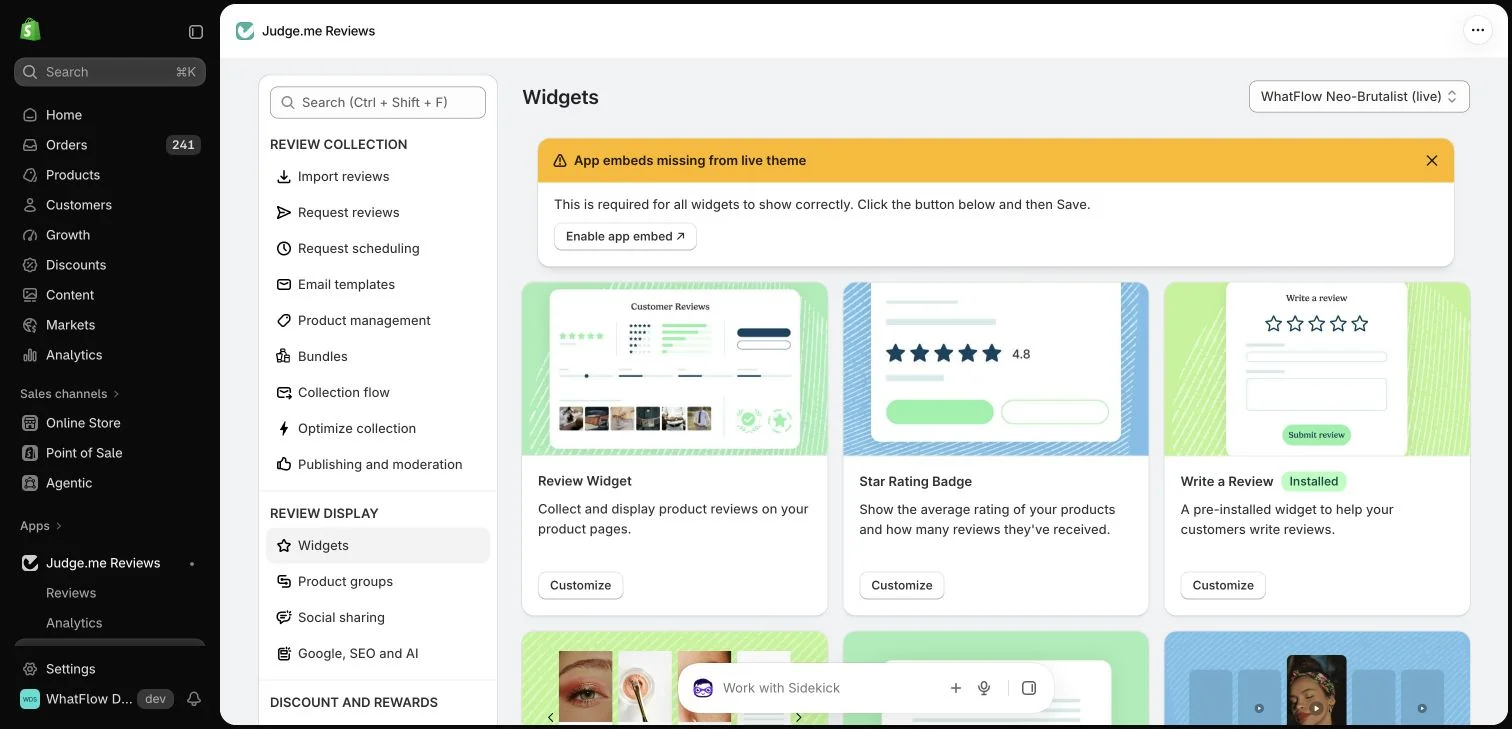
Judge.me widget configuration in the WhatFlow demo store. This setup view has no live theme embed enabled; ratings in the widget cards are interface examples.
Give the customer time to experience the product
An order confirmation is usually too early to ask how the product performed. Delivery may be a better starting point, followed by a delay that reflects actual use. A mug can be assessed quickly; a product requiring installation or several uses needs a different schedule. These are decisions for your store, not universal timing rules.
If you cannot reliably identify delivery, describe the request carefully and avoid claiming that you know the parcel arrived. Let the buyer tell you if it has not. That response is an operational issue worth resolving before you continue a routine reminder sequence.
Ask one clear question and provide one destination
A practical request explains which product you mean and gives the buyer a direct route to the appropriate review form. Ask for an honest account, including what worked and what could be improved. A customer should not have to navigate several product pages to find the correct place to write.
For example: “How did the ceramic travel mug work for you? Share your experience here when you have a moment.” Treat this as draft wording, not an approved WhatsApp template. The actual message must use the right channel permissions and any required template approval.
Keep reviews and support connected
Some customers answer the request with a question about a missing part, a return or a delayed shipment. Give those messages an owner. A review invitation should not become a dead end because the merchant expected a form submission rather than a conversation.
WhatFlow Business API can help a Shopify team handle WhatsApp conversations in its shared inbox. Review collection and verification still belong to your review provider. Sending a customer a form link through WhatsApp does not automatically make the eventual review a verified purchase review.
Measure the process from eligible order to published review
Track a small set of counts: eligible orders, requests actually sent, submissions received and published reviews. Use consistent definitions and a fixed reporting period. If ten requests produce two submissions, that is a small sample to learn from, not a benchmark for every future product.
Look for the first point where the process breaks. Missing phone numbers suggest a contact-data issue. Requests sent before arrival suggest a timing problem. Form visits without submissions may point to a long or confusing form. A bigger reminder schedule will not fix all three.
Review a handful of completed customer journeys each week. Open the message, follow its link on a phone and check the resulting review’s product association. Make sure the public page displays the feedback correctly and that private contact details have not been exposed.
As volume grows, automate the stable parts and keep exceptions visible. WhatFlow includes features across Business API plans and does not charge inbox seat fees, which can make it easier to involve another colleague. Message allowances, rates and the review app’s own terms still determine the total cost.
A useful first-month outcome
Success in the first month is a working process you can explain and repeat: real customers receive a relevant invitation, their answers reach the right place and someone responds when help is needed. A smaller set of credible reviews is a stronger foundation than a page crowded with unsupported claims.
Diagnose a first batch of invitations
Hypothetical example: 20 orders qualify for a first invitation batch, 16 invitations are sent, and three submissions reach the provider. The missing four sends and the gap between invitations and submissions are separate questions. Check contact eligibility and event mapping first, then follow the form on a phone. These example counts describe a diagnostic exercise, not a review-rate benchmark.
Inspect each submission’s product, date and source label before checking its storefront display. Ask a colleague to reply to one controlled invitation as though a part were missing; the conversation should reach a monitored route. WhatFlow Business API can support that WhatsApp conversation while the review provider retains responsibility for the form, publication and verification. Fix the earliest broken stage before increasing audience size.
Before you put this into practice
Follow one invitation link on a phone.
Confirm the submitted review belongs to the intended product.
Give customer questions from invitations a named owner.
Explore WhatFlow Business API for WhatsApp messaging and a team inbox with no seat fees. Features are included across plans, including Free; message allowances and rates differ.
Safwan Adnan is co-founder and CEO of WhatFlow. This guide is published by WhatFlow and includes its product where relevant. Worked examples are illustrative unless a caption identifies an actual demo-store configuration; they are not merchant performance results.
Should a new store import reviews it did not collect?
Only use reviews you have a legitimate right to use and that accurately represent the product and their source. Do not invent purchases, testimonials or verification labels.
Does a WhatsApp review link guarantee a verified review?
No. The review provider applies its own verification requirements. Check its rules for the specific collection method.