A shared team inbox works when each new conversation has an owner, handoffs explain the next step and unresolved cases receive a regular review. Define response hours, escalation decisions and accurate reference answers before adding complexity. WhatFlow Business API includes an inbox without seat fees across plans, including Free; messaging allowances and rates still differ.
A handoff should state known facts, missing facts and the next action.
Review unresolved dependencies as well as response speed.
A shared inbox solves an access problem: more than one person can see the customer conversation. It does not automatically solve the ownership problem. If everyone assumes someone else is answering, the buyer still waits, only now several colleagues can see the delay.
Start with a small set of operational rules. Decide who checks new messages, what requires escalation and how the next person can understand an open case. A modest process that the team follows is more useful than elaborate routing no one maintains.
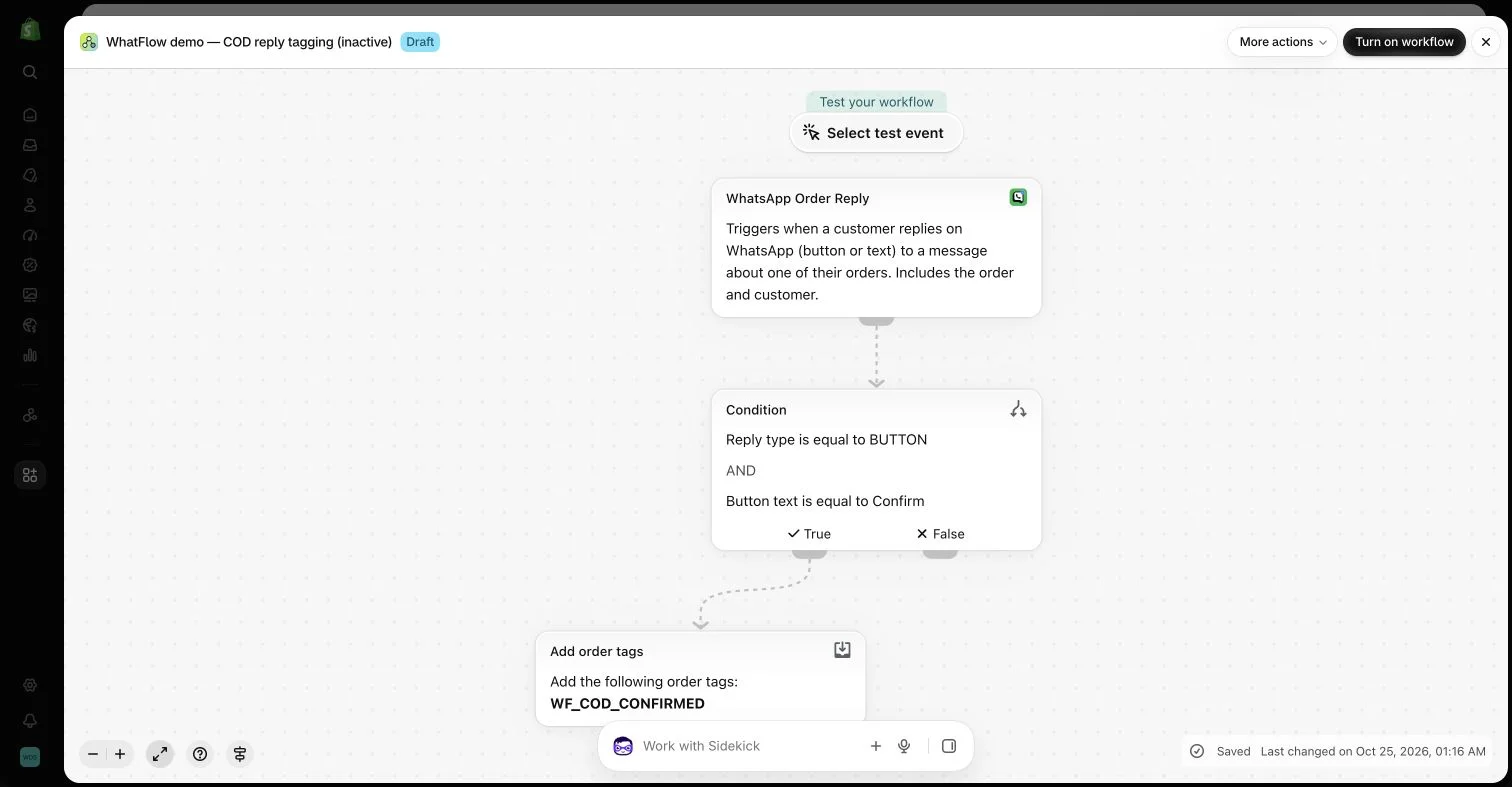
An inactive workflow in the WhatFlow demo store illustrates order-reply configuration. No customer messages or order changes were made.
Give new conversations an owner
Define a person or rotation responsible for checking new messages during the store’s working hours. Make the handover between shifts explicit. The customer should not need to repeat the question simply because one colleague finished for the day.
Describe response expectations honestly. If the store does not provide continuous support, avoid a greeting that promises an immediate human answer at all times. An automated acknowledgment can set context, but it should not create the impression that the issue has already been investigated.
A useful handoff explains what the buyer needs, what has been checked and what remains open. Keep it concise and tied to the conversation. Another colleague should not have to reconstruct the case from scattered screenshots in a private chat.
Use the note or handoff capabilities your actual tools provide. Do not promise automatic assignment or a particular ticket state unless the configured integration supports it. A shared view of the messages is not proof that a workflow created a separate operational task.
Keep product answers accurate
Create a small reference set for common questions about fit, compatibility, delivery and returns. Give each answer a source and a review owner. Saved replies should make accurate help easier, not preserve an outdated promise indefinitely.
Encourage colleagues to adapt the answer to the question. A long generic policy pasted into every conversation can leave the buyer’s specific concern unanswered. If the product is unsuitable or the team does not yet know the answer, say that clearly and explain the appropriate next step.
Maintain accurate saved replies so colleagues share the same source without copying irrelevant policy text.
A refund question, a product defect and a technical compatibility issue may need different people. State which colleague can make the relevant decision and what information they need. Do not ask the buyer for unnecessary documents simply because the escalation checklist is vague.
Keep private information in controlled systems and avoid copying full conversations into broad-access reports. The escalation summary should help someone act while preserving the context and the customer’s expectations about how their information is handled.
Use WhatFlow’s commercial model appropriately
WhatFlow Business API includes a team inbox without seat fees and provides features across plans. That can make it easier for a founder to involve another colleague without purchasing an additional inbox seat. Message allowances and rates still differ by plan.
The lack of a seat charge is a budgeting advantage, not an instruction to give unrestricted access to everyone. Use the access controls available in your actual setup and give colleagues the responsibility and context needed for their role.
Review unresolved cases, not only message volume
A busy inbox can look productive while the same cases remain open. Set aside time to review conversations awaiting a customer reply, an internal decision or an external update. Distinguish those states so a colleague knows what kind of follow-up is appropriate.
Track recurring causes and improve the underlying page or process. The strongest inbox operation does more than answer quickly: it keeps ownership clear, resolves the actual question and gradually reduces avoidable confusion for future customers.
Write a handoff another colleague can act on
Imagine a fictional customer waiting for confirmation that an accessory fits an older product version. A useful handoff says: “Customer has version A; current accessory page lists version B only. Product owner is checking compatibility. Reply after that check; no compatibility promise made.” Keep that note in the controlled conversation or supported handoff process. It tells the next colleague what is known, what is missing and why the case remains open.
At the shift change, the receiving person should be able to identify the next action without asking the customer to repeat the question. Review waiting cases by dependency: customer information, an internal decision or an outside update. Where the tool does not support a desired state or automatic assignment, use a simple maintained procedure rather than describing an unconfigured feature. WhatFlow’s no-seat-fee inbox can make collaboration easier to budget, but the handoff still needs a named owner.
Explore WhatFlow Business API for WhatsApp messaging and a team inbox with no seat fees. Features are included across plans, including Free; message allowances and rates differ.
Safwan Adnan is co-founder and CEO of WhatFlow. This guide is published by WhatFlow and includes its product where relevant. Worked examples are illustrative unless a caption identifies an actual demo-store configuration; they are not merchant performance results.