Use AI for Shopify support by giving it verified policy or product information and a narrowly defined writing task, then having a colleague review the draft against the customer’s question. Check live order facts separately. The person sending the reply should verify every promised action, link and exception instead of treating fluent wording as evidence.
Key takeaways
Separate reusable policy wording from live order information.
Give the reviewer specific facts and promises to check.
Evaluate correction time alongside drafting time saved.
AI can help a small team turn a rough explanation into a clearer reply. It can also produce a confident answer to a question the store has not actually resolved. The useful boundary is between assistance with wording and authority to decide what happened to a customer’s order.
Choose a narrow first task, such as shortening a verified policy explanation or drafting an internal outline. Keep the source information and the review step visible. A fluent paragraph should not be treated as evidence that a refund, shipment or product capability exists.
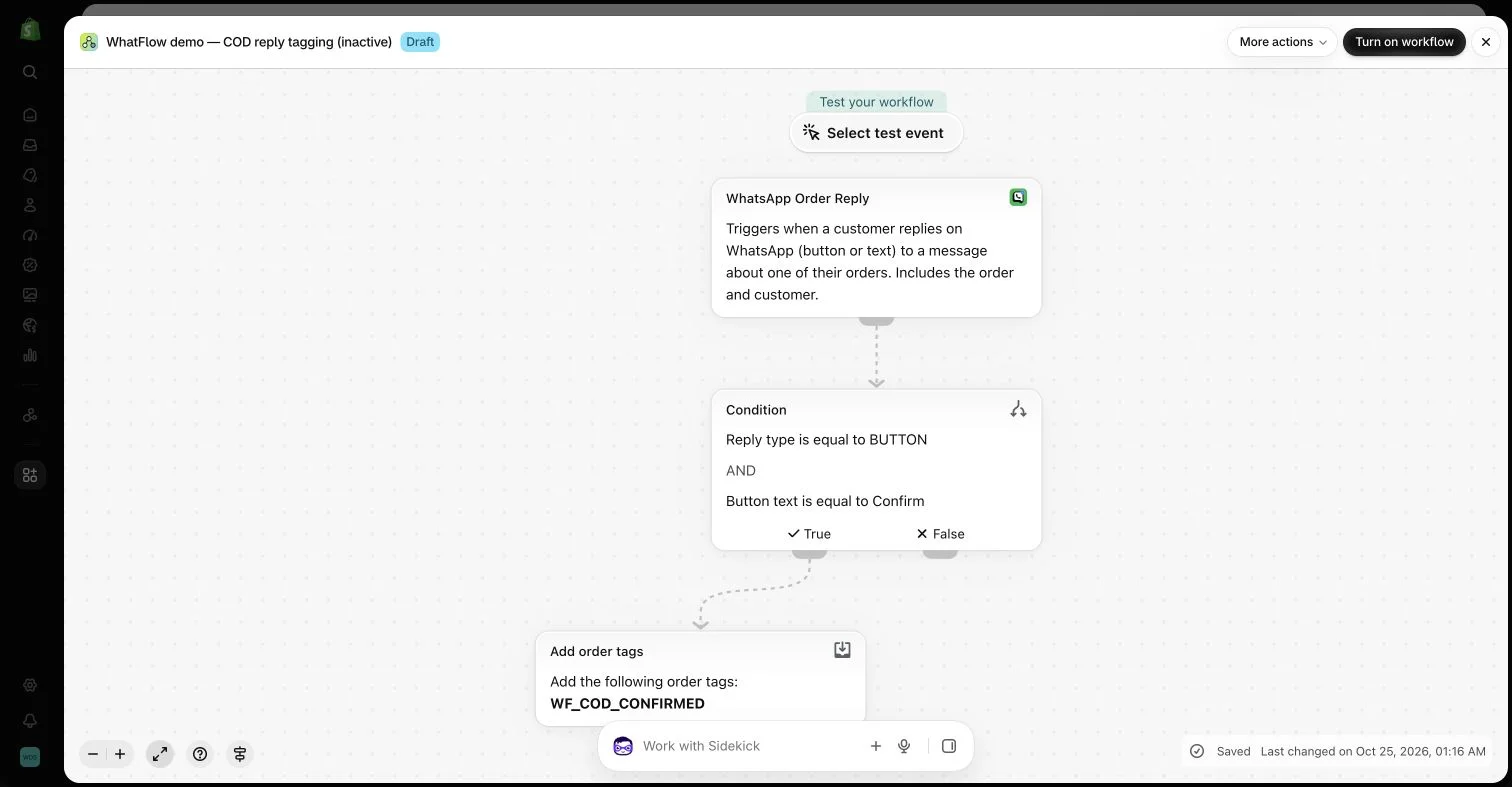
An inactive workflow in the WhatFlow demo store illustrates order-reply configuration. No customer messages or order changes were made.
Start from verified information
Give the drafting process a current, approved explanation of the relevant policy or product detail. Avoid asking it to invent the answer from a vague customer question. If the team does not know whether an accessory fits, the correct next step is to check, not to request more persuasive wording.
Keep changing facts separate from reusable language. Delivery status, inventory and account actions need current system information. A saved prompt or an old conversation cannot establish the present state of a particular order.
Use the minimum customer context needed for the task and follow the store’s approved tool and data-handling process. Many writing exercises can use a generalized question without names, addresses or a complete private conversation.
Do not paste credentials, private attachment links or unrelated customer records into a drafting system merely because it accepts a large prompt. A useful assistant should reduce writing effort without creating an unnecessary second copy of sensitive operational information.
Make the reviewer’s task concrete
Check the factual answer, promised next step, tone and any limitation the buyer needs to understand. Verify that the text does not claim an action has already happened when it is only planned. Review links and product versions rather than assuming they remain correct.
Read the answer against the original question. An AI draft may summarize the general topic while missing the buyer’s specific concern. The final reply should resolve the practical uncertainty or clearly explain what will be investigated next.
Use natural language to describe workflow intent carefully
Tools such as Shopify Sidekick can assist with supported workflow drafting, but the generated steps still require review. The event, conditions, recipient and actual action matter more than whether the diagram looks plausible. Keep examples inactive while checking the configuration.
If a needed WhatFlow Flow task is missing from the draft, select the supported installed task manually rather than assuming another action is equivalent. Standard visual configuration can avoid API code, but it cannot remove the need to understand which record the workflow will affect.
Use the Shopify Flow overview to check supported workflow concepts before accepting generated steps.
Keep the human conversation available
A customer reporting a difficult issue may need a person to interpret context and make an appropriate decision. Do not disguise every automated message as a personal staff response. Be honest about the process and the team’s response expectations.
WhatFlow’s team inbox can support the human handoff, with no inbox seat fees on Business API plans. The relevant message format and channel requirements still apply. AI-generated wording does not automatically become an approved WhatsApp template or permission to contact a new audience.
Evaluate time saved and errors avoided
Review a sample of assisted replies for accuracy and unnecessary follow-up. Faster drafting is useful only if the team does not spend the saved time correcting invented promises. Keep examples of recurring mistakes and adjust the approved source material or the task scope.
The goal is a clearer, dependable answer produced with less repetitive writing. Keep judgment, current system facts and consequential decisions connected to the appropriate human or supported process. That makes AI assistance useful without asking the customer to absorb its uncertainty.
Turn a return question into a reviewable draft
Hypothetical example: a customer asks whether an opened accessory can be returned. Supply the drafting tool with the approved return conditions and a generalized version of the question. Ask for a short explanation that preserves the opened-item restriction and identifies anything still unknown. Leave names, addresses and unrelated order history out of this writing task.
The reviewer checks the product category, the policy version and the proposed next step. If an exception needs authorization, the reply should explain that review rather than promise acceptance. Keep a simple log of drafting time, review time and factual corrections for the first group of replies. Expand the task only when review remains useful and manageable.
Before you put this into practice
Attach the maintained policy source to the drafting task.
Check that no planned action is described as completed.
Record recurring errors and narrow the prompt accordingly.
Explore WhatFlow Business API for WhatsApp messaging and a team inbox with no seat fees. Features are included across plans, including Free; message allowances and rates differ.
Safwan Adnan is co-founder and CEO of WhatFlow. This guide is published by WhatFlow and includes its product where relevant. Worked examples are illustrative unless a caption identifies an actual demo-store configuration; they are not merchant performance results.