Write saved support replies around specific customer questions, with the direct answer first and obvious fields for facts a colleague must verify. Keep policy summaries current and allow staff to adapt the wording to the actual concern. Distinguish these working drafts from approved outbound WhatsApp templates, and retire replies that repeatedly create avoidable follow-up questions.
Key takeaways
Organize replies by task rather than generic reassurance.
Mark current order facts as required checks before sending.
Maintain the policy source and owner with each important reply.
Saved replies can help a small team answer consistently, but they can also make the customer feel unheard. The difference is whether the reply supports a real answer or replaces the effort of understanding the question. A polished paragraph is not useful if it responds to a different problem.
Build the library around recurring tasks, not broad sentiments such as “customer reassurance.” Each reply should have a clear use case, a trustworthy information source and a short section the colleague must adapt before sending.
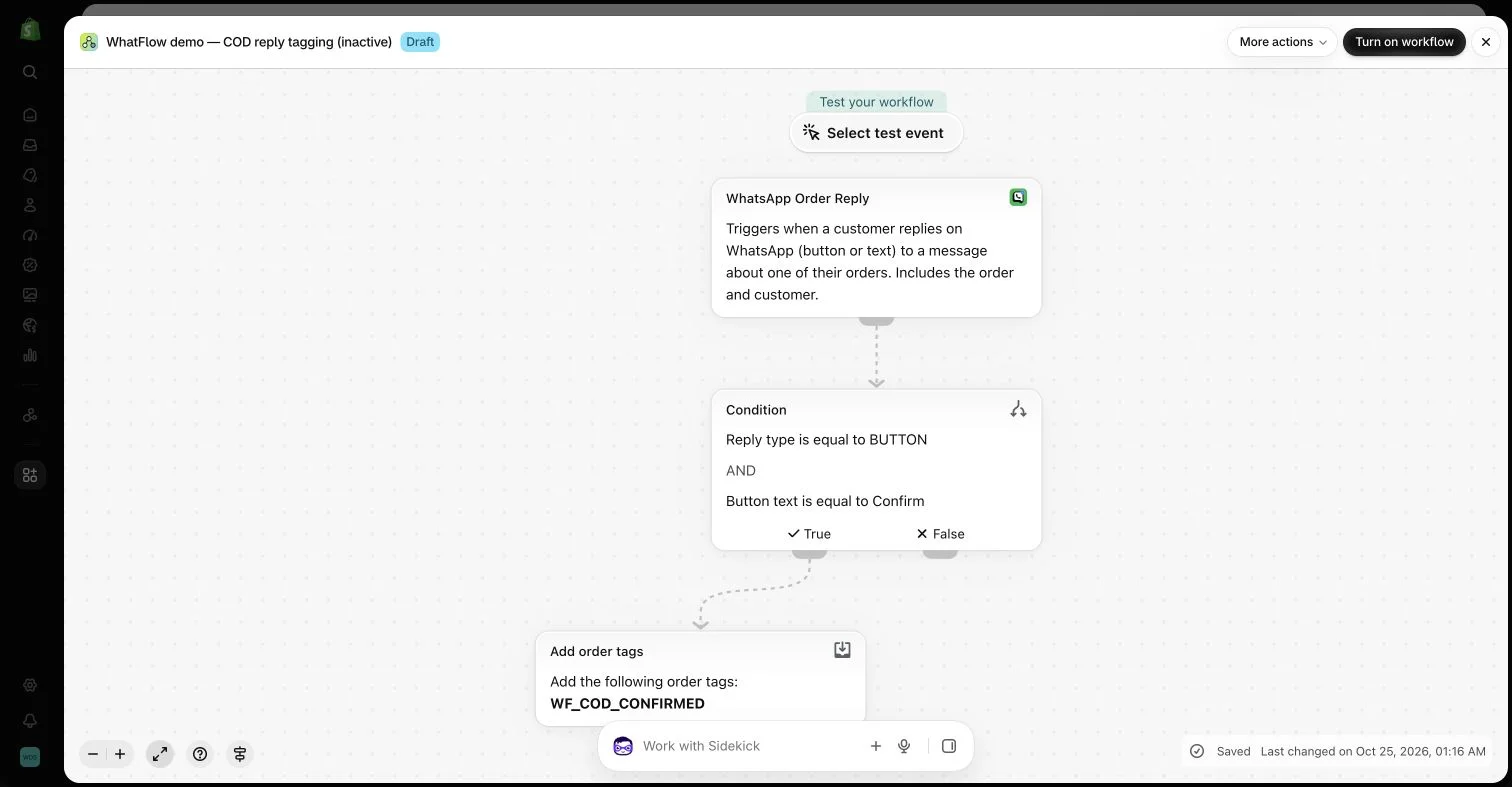
An inactive workflow in the WhatFlow demo store illustrates order-reply configuration. No customer messages or order changes were made.
Start with the questions that repeat
Review recent conversations and identify practical themes: choosing a size, finding tracking, understanding a return condition or checking compatibility. Separate cases that sound similar but require different decisions. “Where is my order?” can mean the tracking link is missing or that a carrier status has stopped changing.
Write the direct answer first. A short acknowledgment can help, but avoid several sentences of generic appreciation before the customer learns what to do. The reply should make the next step clearer than it was before the message arrived.
Pair the library with clear shared inbox handoffs so a saved answer has a responsible sender.
Mark the parts that require a real check
Use obvious placeholders for values a colleague must confirm, such as the relevant product version or the current delivery status. Do not make an example order number look ready to send. Test how the workflow handles missing data before using automated field insertion.
Some statements should never be sent without investigation: a refund has been issued, a replacement has shipped or an order has been cancelled. Keep those claims tied to the actual system state. A saved reply cannot turn an intended action into a completed one.
Keep policy summaries aligned with the source
Link the reply to the current policy or product information. If the store changes its return conditions, update the saved explanation at the same time. Otherwise a colleague may continue offering an old promise even after the public page has been corrected.
Summaries should preserve the practical limitation the buyer needs to know. Avoid saying “free returns” when charges or eligibility depend on circumstances. A slightly longer accurate answer is preferable to a reassuring phrase that the next step contradicts.
Leave room for ordinary human wording
A colleague should be able to replace an irrelevant opening, answer the buyer’s exact question and remove unnecessary detail. The goal is consistency of information, not identical sentences in every conversation. Avoid forcing a cheerful tone when someone is reporting a genuine problem.
Use the customer’s words where that helps recognition, without repeating private information unnecessarily. A clear explanation of what will happen next usually sounds more human than a long apology filled with brand slogans.
Distinguish manual replies from WhatsApp templates
A saved staff response is not automatically an approved business-initiated WhatsApp template. The applicable customer-service window and message rules still determine which formats can be sent. Keep the operational writing library and the approved-template setup distinct.
WhatFlow Business API supports both conversational work in the team inbox and configured message actions. Select the format appropriate to the actual interaction. Do not assume that storing text in a convenient place makes it eligible for every audience or sending situation.
Assign an owner and review date to the important replies. Remove duplicates that differ only in tone, and revise answers that repeatedly cause follow-up confusion. Keep examples of when each reply should not be used; those boundaries often prevent the most awkward customer experiences.
Measure usefulness through resolved questions and fewer avoidable follow-ups rather than the number of saved responses created. A compact library that helps colleagues think clearly is better than hundreds of canned paragraphs no one can confidently choose between.
Hypothetical example: create separate replies for “I cannot find tracking” and “tracking has stopped changing.” The first points to the verified tracking destination. The second requires the colleague to inspect the current status and choose an investigation step. Label placeholders such as [checked status] and [next review time] so a sample value cannot accidentally look ready to send.
Store a short “do not use when” note with each reply, such as a cancelled order or an open delivery investigation. Have another colleague choose the right reply from a few anonymized questions before adding it to the library. WhatFlow Business API can support the conversation in its team inbox; the colleague still needs to confirm the facts and choose a message format appropriate to the interaction.
Before you put this into practice
Separate questions requiring different investigations.
Mark every field that needs a current factual check.
Assign the reply a source, owner and review trigger.
Explore WhatFlow Business API for WhatsApp messaging and a team inbox with no seat fees. Features are included across plans, including Free; message allowances and rates differ.
Safwan Adnan is co-founder and CEO of WhatFlow. This guide is published by WhatFlow and includes its product where relevant. Worked examples are illustrative unless a caption identifies an actual demo-store configuration; they are not merchant performance results.
Is a saved reply the same as an approved WhatsApp template?
No. Approved templates and free-form customer-service messages have different requirements. Choose the format supported by the actual sending situation.
Should every colleague send identical wording?
Keep facts consistent while allowing the reply to answer the customer’s specific question and match the situation appropriately.