A useful review request identifies the store and product, asks for honest experience and provides the correct review link. Keep reminders optional in tone and suppress completed reviewers where supported. WhatsApp examples are drafts, not approved templates; check the applicable message format and permissions, and make sure someone monitors any support replies the invitation encourages.
Key takeaways
Identify the purchase and make the review destination clear.
Ask for honest detail without steering the rating.
Test message variables and support replies before sending.
A review request does not need to sound like a campaign announcement. The customer needs to recognize the purchase, understand what you are asking and find the right link. Anything that obscures those three things adds effort to a task they are doing for your business.
The examples below are writing starting points. They are not pre-approved WhatsApp templates, actual customer messages or promises of a particular response rate. Adapt them to your product, permissions and review provider before using them in a live sequence.
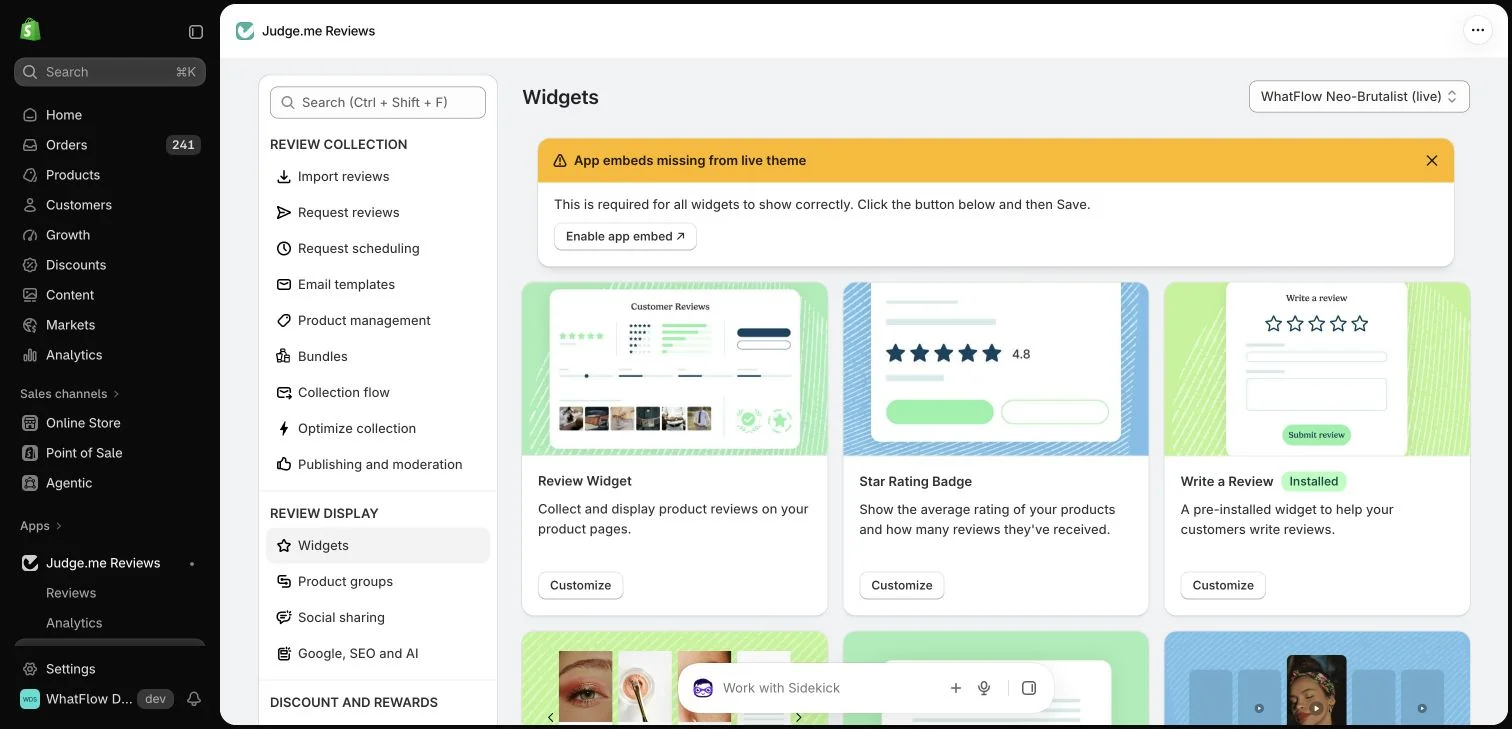
Judge.me widget configuration in the WhatFlow demo store. This setup view has no live theme embed enabled; ratings in the widget cards are interface examples.
Start with the product, not the brand’s ambition
A vague message asking the buyer to “support our journey” makes the request about the store. A more useful invitation identifies the item and asks about the customer’s experience. Mentioning the product also helps someone who has placed several recent orders find the correct context.
A simple email opening could be: “How is the insulated lunch bag working for you? We would appreciate an honest review of what you liked and what could be better.” Follow it with a clearly labeled review link. Avoid adding several promotional buttons around the main task.
A concise draft is: “Hi [first name], this is [store]. When you have had a chance to use [product], you can share an honest review here: [review link]. If you need help with the order, reply to this message.” Each placeholder needs a real, appropriate value before sending.
Do not assume a short message is unrestricted. Eligible outbound WhatsApp messages may require an approved template, and the customer must meet the applicable messaging requirements. A conversational tone is a writing choice; it does not replace the channel’s rules or a working opt-out process.
A reminder that adds clarity rather than pressure
A reminder can acknowledge that the buyer may not have had time: “A quick follow-up about [product]: if you would like to share your experience, your review link is [link]. There is no need to reply if you have already reviewed it.” Use reliable suppression where the tools support it.
If you cannot identify completed reviewers across channels, say less and send fewer reminders. Repeatedly asking someone who already submitted feedback undermines the care the first message tried to convey. Decide which system owns the reminder schedule instead of letting every installed app run independently.
Use the WhatsApp Business messaging policy to check applicable messaging permission and channel requirements; a relevant message still needs the appropriate sending process.
Ask for useful detail without steering the rating
A product-specific prompt can help: “What was the fit like, and how did the fabric feel after washing?” That invites information a future buyer can use. It is different from telling the customer that a five-star rating would help the store or implying that criticism is unwelcome.
For photo requests, explain what would be useful and make the addition optional. “A photo showing the bag in everyday use is welcome” is more concrete than “send amazing content.” Obtain the appropriate permission before reusing the image in advertising or other marketing placements.
Give support replies a real destination
If the invitation says “reply if you need help,” someone needs to read those replies. Decide who checks the inbox, how order context is found and when a question should move to another colleague. The request is part of a customer relationship, not just a link-delivery exercise.
WhatFlow’s shared inbox can support that conversational handoff without inbox seat fees on Business API plans. Review storage, publication and verification remain the review provider’s responsibility. Avoid telling customers that a WhatsApp reply itself will appear as a product review unless your actual integration does that.
Read the finished message on a small screen. Remove an introductory sentence if it delays recognition of the product. Check that the link opens the intended form, that the language matches the customer and that the sender identity is clear. Test placeholders with missing values before automating them.
The final check is simple: would the customer understand the request without knowing your internal marketing goal? If they can recognize the purchase, leave an honest answer and ask for help, the message has done its job.
Adapt the same request to a real product question
For a hypothetical insulated lunch bag, an email could ask: “How has the lunch bag worked for your usual container? Share what fits well and what could be better: [review link].” A WhatsApp draft could say: “Hi [name], this is [store]. If you have tried [product], we welcome your honest review: [link]. Reply here if you need order help.” These are writing examples; replace placeholders and check the actual approved WhatsApp setup before use.
Use the invitation to ask about experience rather than to solicit a particular rating. Test a missing first name, a long product title and an order containing several products. Decide whether the destination makes the product choice clear instead of adding every item to a crowded message. For the reminder, verify the completed-review exclusion across the tools you use. If that connection is absent, keep the follow-up modest and explain the limitation internally.
Explore WhatFlow Business API for WhatsApp messaging and a team inbox with no seat fees. Features are included across plans, including Free; message allowances and rates differ.
Safwan Adnan is co-founder and CEO of WhatFlow. This guide is published by WhatFlow and includes its product where relevant. Worked examples are illustrative unless a caption identifies an actual demo-store configuration; they are not merchant performance results.