Plan a Shopify win-back campaign by defining inactivity against the product’s normal buying cycle, selecting an eligible audience and offering a credible reason to return. Check stock, unresolved service issues and channel preferences before sending. Set a limited sequence with purchase and opt-out exits, then evaluate margin, costs and customer replies alongside attributed orders.
Key takeaways
A normal repurchase gap depends on the product category.
Use a relevant update or product fit before defaulting to discounts.
Limit the sequence and stop when eligibility changes.
“Customer has not ordered recently” is a starting filter, not a complete win-back strategy. Someone who bought furniture six months ago may be behaving normally. Someone who used to buy a refill every month presents a different question. Define inactivity in relation to the product and relationship.
A useful win-back campaign gives the customer a credible reason to return. That can be a relevant new product, an improvement they previously asked about or a carefully chosen offer. The message should not manufacture personal familiarity or imply that the store knows why the customer stopped buying.
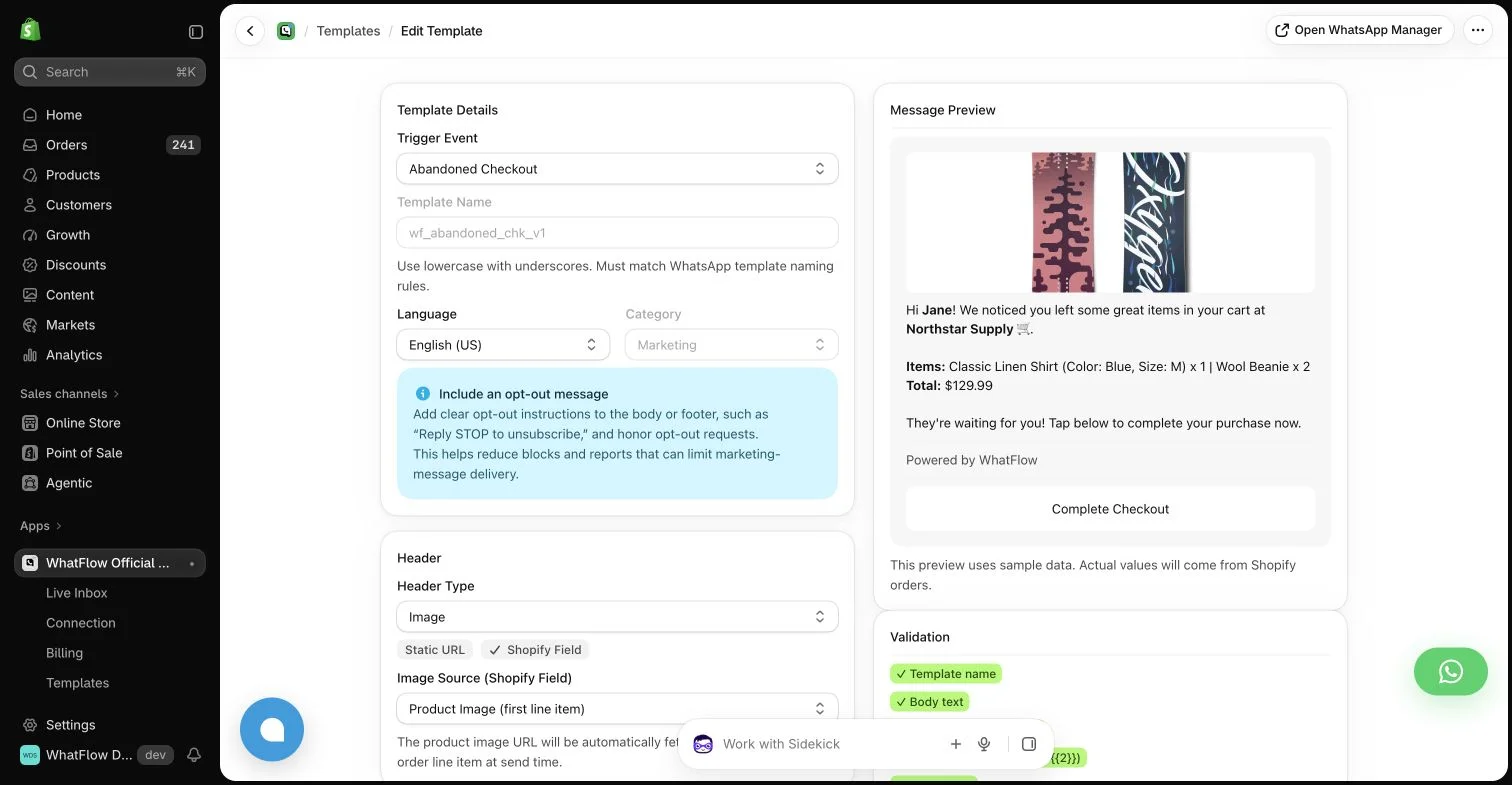
WhatFlow template editor in the demo store. Sample message data illustrates configuration, not a completed send or measured campaign outcome.
Define the audience before choosing the offer
Use an inactivity period that makes sense for the category, and distinguish first-time buyers from previously frequent customers where the data supports it. Keep the criteria simple enough that another colleague can explain why someone entered the group.
Exclude customers who should not receive the channel and review recent operational context. A person waiting for an unresolved refund may not welcome a cheerful “we miss you” campaign. Do not claim that every support status is synchronized unless your actual tools provide and use that data.
For regularly consumed products, compare the audience with replenishment reminder logic before calling a buyer inactive.
A broad discount is easy to write but may be unrelated to the customer’s interests. Start with the previous purchase category and the current catalog. A compatible accessory, a genuinely improved product or useful new information can make the message more relevant.
Check stock and destination eligibility before sending. A customer who returns to an unavailable item has encountered another obstacle rather than a reason to reconnect. If the offer applies only to a subset of products or regions, make that limitation clear near the call to action.
Acknowledge the gap without guilt
Avoid wording that makes the customer responsible for the store’s growth. A simple introduction to the relevant update is enough. Do not invent a personal note from the founder if the message is an automated campaign sent to a broad audience.
For WhatsApp, the copy still needs the appropriate template and recipient permissions. A customer who once used the channel for order support has not necessarily agreed to every later marketing message. Make opting out straightforward and ensure the team knows how that preference is handled.
A win-back campaign can surface old problems. Someone may explain that the previous product disappointed them or that they moved to a different option. Give those replies a support route rather than treating every response as a sales objection to overcome.
WhatFlow’s shared inbox can help colleagues handle the conversation without per-seat inbox charges on Business API plans. Decide who owns unresolved cases and how to involve the appropriate product or operations person. A friendly campaign needs a dependable follow-through process.
Limit the sequence and define the exit
A win-back effort should not become an endless loop of increasingly urgent discounts. Set a limited sequence and a clear end. A new purchase, opt-out or other defined condition should update eligibility where the connected data supports it.
Coordinate with email and SMS. The customer experiences the combined contact volume, so different apps should not each run a full independent “last chance” sequence. Keep the actual offer deadline honest and do not reset it merely because another reminder is scheduled.
Review margin, message cost, discount use and subsequent customer behavior. A campaign can generate purchases while giving away too much value or increasing opt-outs. Attribution also does not establish that every order was incremental.
Use the response themes to improve the next attempt. If buyers return because a compatibility problem was solved, that is a clearer learning than “discounts work.” A useful win-back program becomes more specific about the reason to return and more respectful about when to stop asking.
Distinguish a missed refill from normal inactivity
Hypothetical example: a store sells refill packs and durable dispensers. A long gap after buying a dispenser may be normal, while a similar gap for someone who regularly buys refills may merit review. Create separate groups using observed order history rather than one store-wide inactivity threshold. Check whether the refill is still compatible and available in the customer’s market.
Give the refill group a relevant explanation of the current option and a straightforward destination. Keep a note of the audience rule, offer conditions and sequence end so the campaign can be reviewed later. WhatFlow Business API can support the eligible WhatsApp message and replies. If customers explain a product problem, route that feedback to support before treating it as an objection to the offer.
Before you put this into practice
Define inactivity separately for materially different buying cycles.
Verify the return destination, availability and offer conditions.
Explore WhatFlow Business API for WhatsApp messaging and a team inbox with no seat fees. Features are included across plans, including Free; message allowances and rates differ.
Safwan Adnan is co-founder and CEO of WhatFlow. This guide is published by WhatFlow and includes its product where relevant. Worked examples are illustrative unless a caption identifies an actual demo-store configuration; they are not merchant performance results.