A replenishment reminder should connect an eligible purchase to the correct refill at a plausible time, while acknowledging that actual usage varies. Start with one product, document the interval as an assumption and check for repeat purchases, returns or other stopping conditions where supported. Review timing replies, useful purchases and costs before expanding the sequence.
Key takeaways
Treat consumption timing as an assumption, not personal knowledge.
Match the refill to the actual product and quantity context.
Test repeat-order and exception handling before expansion.
A replenishment reminder is useful when it arrives near a genuine need. It becomes irritating when it confidently announces that the customer is running out despite knowing nothing about their usage. Treat consumption timing as a store hypothesis, not personal knowledge.
Start with a product that has a reasonably understandable repeat cycle. Define the eligible purchase, likely next item and conditions that should stop the reminder. A small, well-understood program is easier to improve than one covering the entire catalog with a single delay.
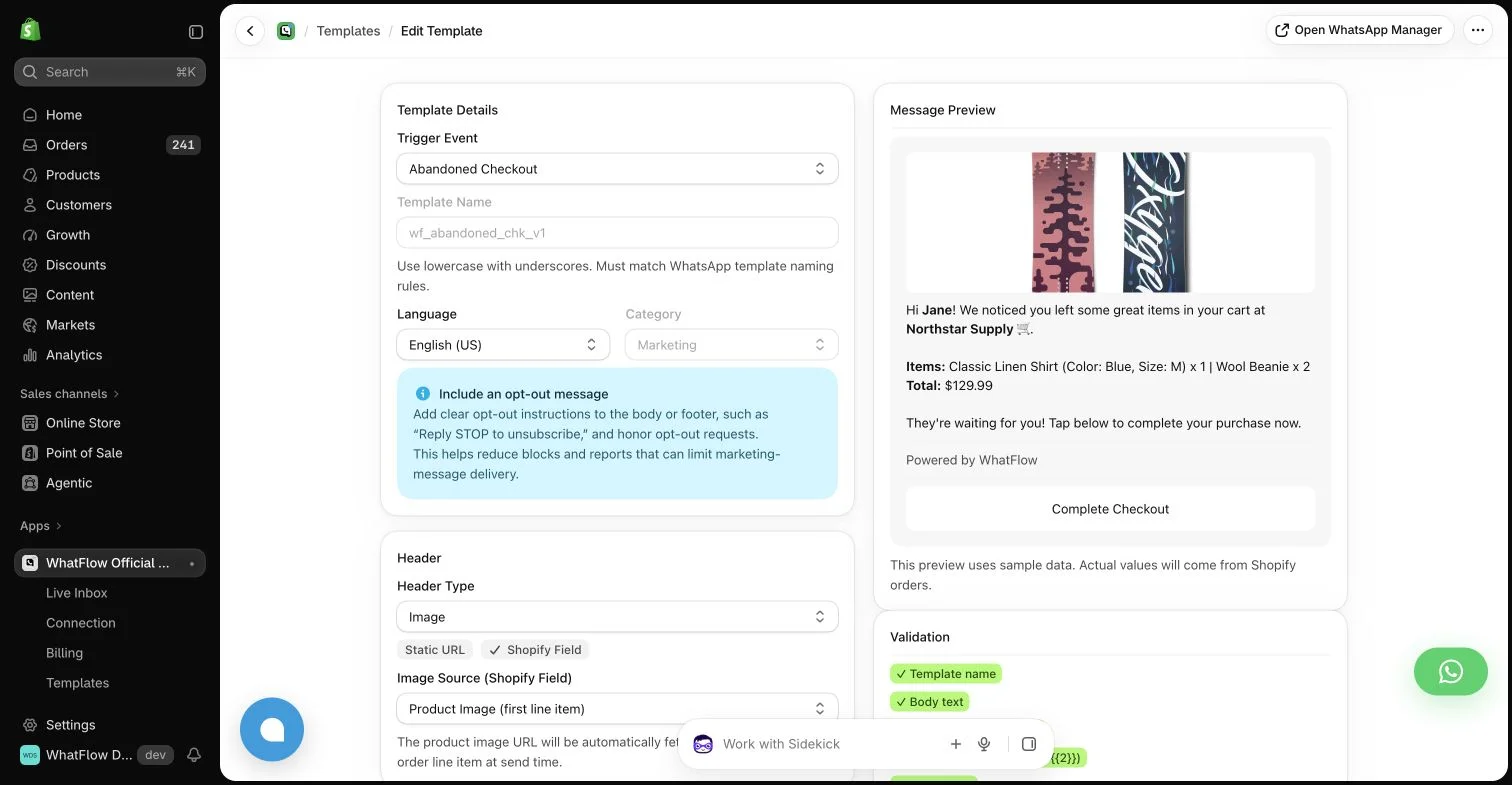
WhatFlow template editor in the demo store. Sample message data illustrates configuration, not a completed send or measured campaign outcome.
Match the next item to the original purchase
Check pack size, format and compatibility. A refill for one dispenser version may not suit another. A customer who bought a sample pack may want guidance on a full-size choice rather than an automatic repeat of the same order.
Use the product data your store actually maintains. If the mapping between an original item and its refill lives only in one employee’s memory, document it before automating the recommendation. An incorrect link can undermine an otherwise carefully timed message.
Set a starting interval and label it as an assumption
Use product knowledge and observed repeat orders to choose an initial delay. Account for quantity where your tools can do so reliably. Two packs may justify a different schedule from one, but only if the underlying data and rule are understandable.
The customer may use the product occasionally, share it with others or have bought it as a gift. Write the reminder so those possibilities remain plausible. “If you are ready for a refill” is more accurate than “Your supply runs out today.”
Check whether the need has already been met
Before sending, use supported conditions to identify recent repeat purchases or another active replenishment arrangement. If the relevant system cannot supply that information, reduce the strength of the claim and the frequency of the sequence. Do not pretend the message reflects a complete view of the customer’s purchases.
Define how cancelled orders, replacements and returns affect eligibility. A replacement sent after a defect is not necessarily the same as a normal second purchase. Keep the operational distinction visible so the automation does not infer the wrong stage of the relationship.
Use the WhatsApp Business messaging policy to check applicable messaging permission and channel requirements; a relevant message still needs the appropriate sending process.
Offer a helpful choice rather than a command
The message can link to the correct refill and invite a question about size or usage. It can also make clear that the customer can ignore the reminder if it is not relevant yet. Avoid presenting a subscription as already selected when the buyer has not agreed to one.
WhatsApp can make the question-and-answer part convenient when the customer has the appropriate messaging relationship with the store. Use the required approved template and respect opt-outs. The reminder’s commercial purpose does not disappear because the copy uses a friendly tone.
Give delayed and nonmatching replies a process
Someone may answer weeks later or ask about a different product. The team should see enough context to understand the original reminder without assuming it still reflects current stock or price. Confirm the present details before making a specific offer.
WhatFlow’s inbox and Shopify integration can help the team handle those conversations. Compatible Flow steps can support a configured sequence, but they do not make every consumption estimate correct. Keep a human path for the cases where the customer’s actual need differs from the model.
Improve from the completed cycle
Look at repeat purchases, questions, opt-outs and complaints together. A reasonable order count with many “too soon” replies suggests a timing issue. Clicks without purchases may point to an incorrect product, stock problem or confusing destination.
Review the cost of the program after message charges and any discount. WhatFlow Business API plans include features across tiers and no inbox seat fees, while allowances and rates differ. That can keep the tooling approachable, but relevance still determines whether the reminder deserves to be sent.
Compare reminder timing by purchase context
Imagine a fictional store starting with a 30-day reminder for one consumable. That interval is a test assumption, not a claim about typical usage. Separate a single-pack purchase from a multi-pack order only if quantity is reliably available to the rule. Keep gift purchases and irregular use in mind when writing the copy: “If you are ready for another pack” leaves room for a different need.
At the sending checkpoint, inspect controlled examples of a normal eligible purchase, a recent reorder, a return and a replacement sent after damage. Write the expected outcome for each before testing. After a completed observation period, group replies as too early, ready, wrong product or another question, using only the detail needed. If timing is wrong, change the interval for a future cohort; do not solve every mismatch by adding more reminders to the same person.
Before you put this into practice
Record the initial interval and why it was chosen.
Explore WhatFlow Business API for WhatsApp messaging and a team inbox with no seat fees. Features are included across plans, including Free; message allowances and rates differ.
Safwan Adnan is co-founder and CEO of WhatFlow. This guide is published by WhatFlow and includes its product where relevant. Worked examples are illustrative unless a caption identifies an actual demo-store configuration; they are not merchant performance results.
Can I tell a buyer exactly when their product will run out?
Only if you actually have reliable information establishing that. Most stores should describe replenishment timing as a helpful possibility, not a personal certainty.
Should a recent reorder stop a reminder?
Where supported purchase data is available, define a clear suppression rule so the customer is not reminded to buy something they just ordered.