Collect useful photo and video reviews by requesting a specific product detail, keeping upload optional and preserving the correct product association. Explain the intended use and establish appropriate reuse permission before moving material into other marketing placements. Check private details and the mobile upload path, and keep support attachments separate from public review submissions.
Key takeaways
Ask for useful product context without scripting praise.
A support attachment is not automatically a public review asset.
Check the intended reuse, permission record and final presentation.
A customer photograph can answer a question that a studio image misses: how big the bag looks on a person, how a finish appears in daylight or how a product fits into an ordinary room. The value is in the context. A large folder of unlabelled uploads is much less useful than a few clear examples tied to the correct product.
Build a process for requesting, receiving and using media before asking every buyer for it. The process should explain what would help, give the customer an easy way to participate and make clear how the material may be used.
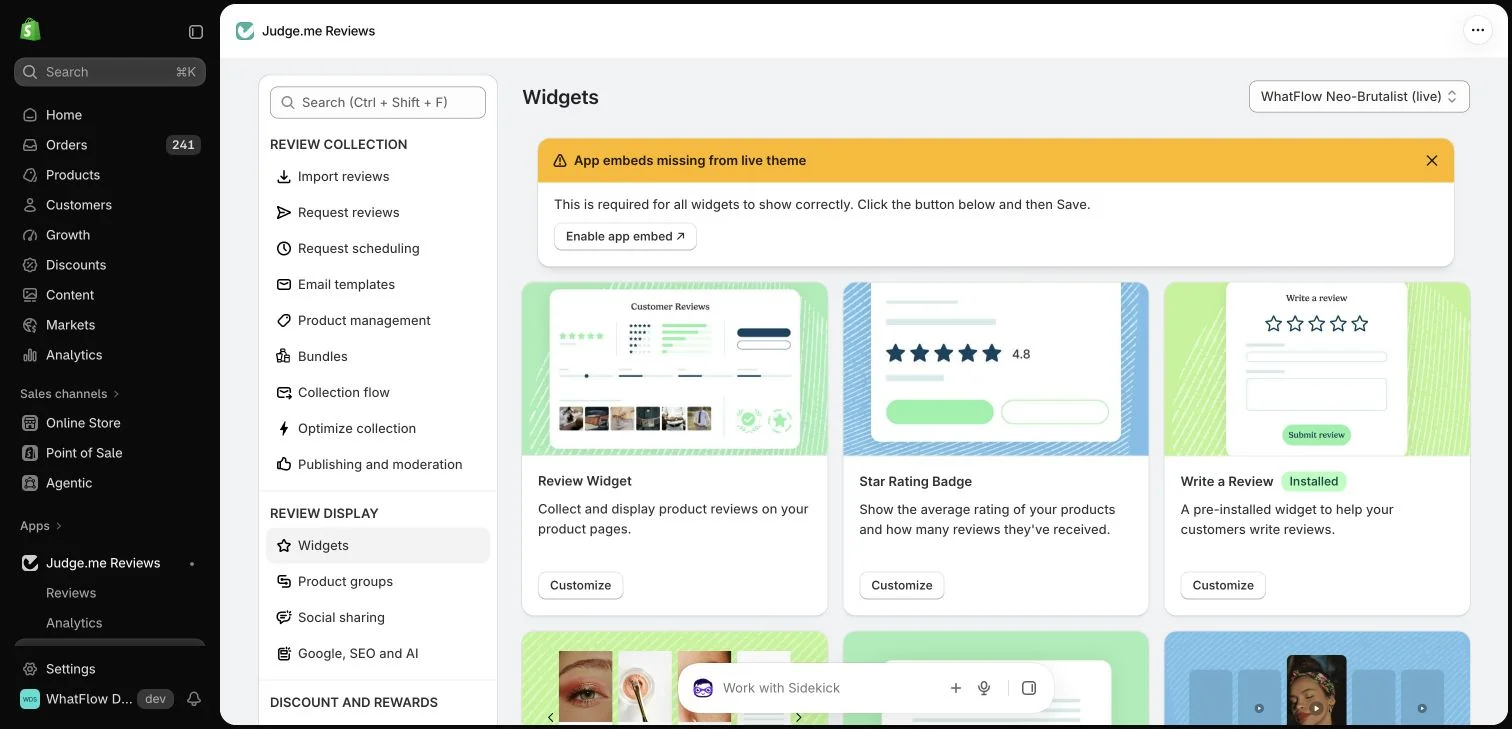
Judge.me widget configuration in the WhatFlow demo store. This setup view has no live theme embed enabled; ratings in the widget cards are interface examples.
Ask for a specific kind of detail
Replace “send us content” with a practical prompt. A homeware store might ask for a photo showing the item in a room. A travel-accessory store might ask what fits inside the organizer. The request helps the customer understand what makes the image useful without scripting a positive review.
Keep the upload optional. A buyer can have a valuable opinion without wanting to photograph their home, family or body. Avoid language suggesting that a text review matters less or that only highly produced videos deserve to be published.
Preserve the product and experience context
Use the review provider’s supported form or collection process so the media remains associated with the correct item. When a customer sends an attachment in a support conversation, do not automatically republish it as a product review. Support evidence and marketing material have different purposes.
WhatFlow can receive WhatsApp media in the inbox, and its Flow integration includes a media-received event. That is useful for handling a conversation. It does not by itself create a public review, a permanent media archive or permission to use the attachment in an advertisement.
A photo displayed as part of a submitted review is not necessarily cleared for every future campaign. Decide what permissions your intended use requires, explain that use and keep a record of the customer’s agreement where appropriate. Review text and media belong to their authors.
For a paid advertisement, check the proposed crop, caption and placement before publication. Avoid implying that a reviewer endorsed a claim they did not make. A photograph of a product in use does not prove a medical, performance or durability claim on its own.
Keep private details out of the final asset
Inspect backgrounds and metadata-sensitive context before reusing customer material. Address labels, school names, children, personal documents and identifiable interiors may create issues that were not obvious when the image first arrived. Ask for a different image or choose another asset when the context is unsuitable.
Do not solve every problem with a tight crop that changes the meaning of the original photograph. The final presentation should still fairly represent the customer’s experience. Keep the original submission and the approved marketing version distinguishable in your internal process.
Design the upload experience for a phone
Follow your own request from a mobile device. Check how many steps come before the upload, whether the customer can understand file requirements and whether the review is lost if they decide not to attach anything. A clear optional step is often better than a long instruction block.
Judge.me’s current form settings describe which photo and video prompts its product supports. Consult that interface for exact configuration. Your messaging channel can bring the customer to the form, but the form itself has to make the task understandable and manageable.
Include the upload journey in mobile widget checks so optional media remains manageable.
Choose presentation around common buyer questions rather than visual polish alone. A useful image with clear context may explain fit or scale better than a carefully styled but ambiguous shot. Preserve attribution and any relevant disclosure when showing the material elsewhere.
Measure how the content is used and whether it answers recurring questions. Do not attach an invented conversion uplift to a collection of customer photos. The first useful outcome is a more informative product experience supported by material you have the right to display.
Keep the submission and reuse decision together
Hypothetical example: a customer submits a photo showing what fits inside an organizer. The review provider associates it with the product. If the store wants to use that image in a campaign, record the proposed placement, caption, permission status and approved asset separately from the original submission. Check the background for address labels or personal documents before preparing the final version.
A similar image arriving through WhatsApp support may help answer a question without being cleared for publication. WhatFlow Business API can receive that conversation media, but the store still needs the appropriate collection and permission process for public use. Keep a clear decision record so a later colleague can tell why one image is available for the campaign while another remains private support evidence.
Before you put this into practice
Ask for one useful visual detail and allow text-only feedback.
Preserve the product association and original submission context.
Check permission, private details and caption meaning before reuse.
Explore WhatFlow Business API for WhatsApp messaging and a team inbox with no seat fees. Features are included across plans, including Free; message allowances and rates differ.
Safwan Adnan is co-founder and CEO of WhatFlow. This guide is published by WhatFlow and includes its product where relevant. Worked examples are illustrative unless a caption identifies an actual demo-store configuration; they are not merchant performance results.
Do not assume so. Support attachments are not automatically marketing assets or product reviews. Establish the intended use and appropriate permission first.
Does receiving a WhatsApp photo create a Judge.me review?
No. Review submission, publication and verification depend on the review provider and the configured integration.