A review moderation policy should define content problems, decision owners, supported actions and an exception process before a difficult review arrives. Apply the same rules to positive and negative ratings, keep a minimal decision record and understand the provider’s publication states. Support should remain available without requiring the customer to remove criticism or change a rating.
Key takeaways
Define content problems separately from negative sentiment.
Use the provider’s actual publication states and supported actions.
Keep support resolution independent of rating changes.
A moderation policy is useful before the first difficult review arrives. Without one, the decision can depend on who is working that day or how upsetting the comment feels. That makes the process harder to explain to customers and harder to apply consistently as the team grows.
The policy does not need to be a large document. It should explain what the store publishes, which issues require review, who makes the decision and how the original customer can get help. Keep the policy grounded in honest feedback rather than protecting a perfect-looking average.
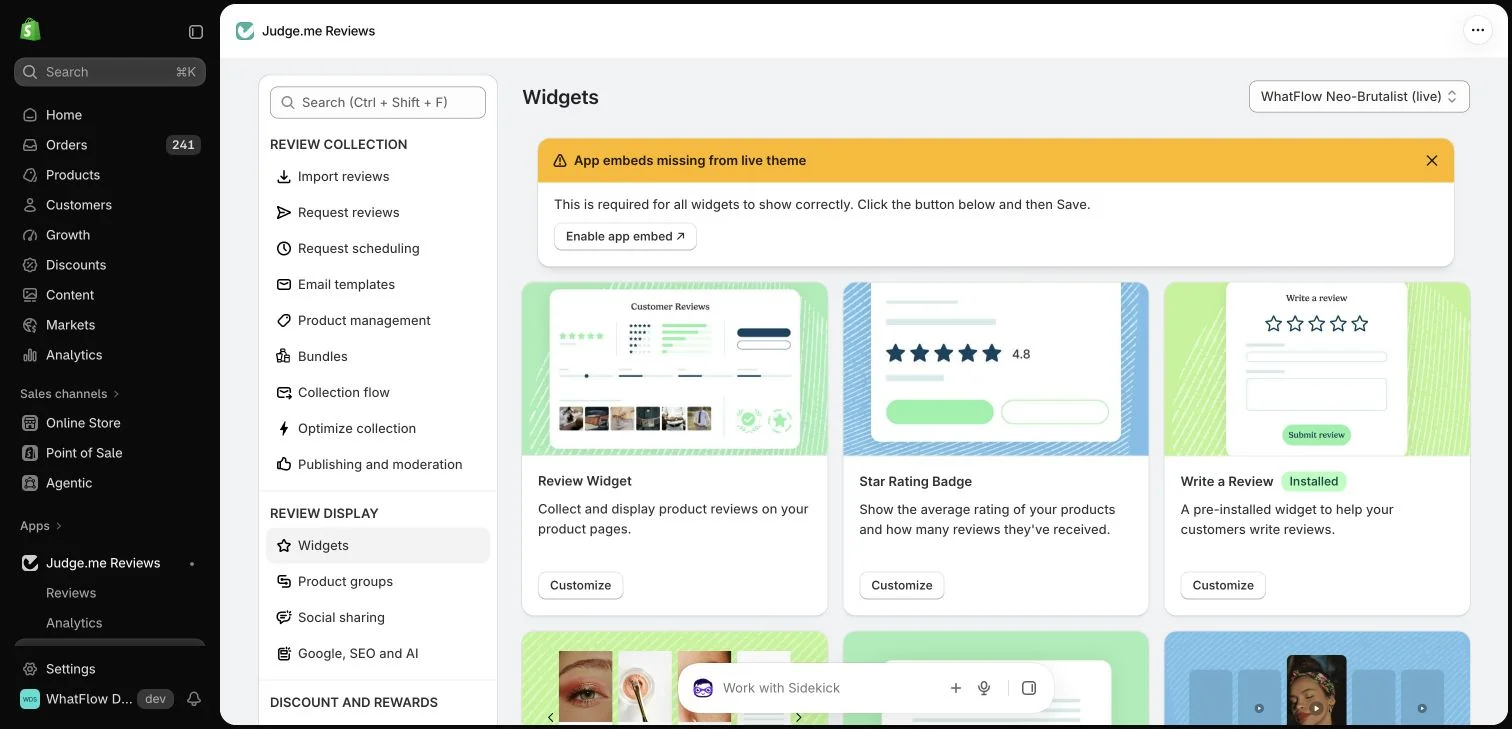
Judge.me widget configuration in the WhatFlow demo store. This setup view has no live theme embed enabled; ratings in the widget cards are interface examples.
Separate criticism from content problems
A customer saying the product did not meet their expectations is providing an opinion. A submission containing someone’s home address creates a different problem. Spam, impersonation, irrelevant material and personal information each need an explicit handling rule rather than one broad category called “negative.”
Write a short example for each reason your team may use. Examples help a colleague distinguish a sharp but relevant complaint from unrelated abuse. Apply the same standard to positive submissions: enthusiastic spam is still spam, and a flattering review can still expose private information.
A small store may have one person making routine decisions and the founder handling uncertain cases. State that responsibility clearly. A colleague should know when they can apply a documented rule and when they should pause for review instead of inventing a new standard.
Keep a brief decision record with the review identifier, reason, action and date. Avoid copying unnecessary personal content into another spreadsheet. The record should help the team understand a decision without creating a second uncontrolled store of customer information.
Understand the review app’s actual statuses
Published, pending, hidden and archived are not universal synonyms across every app. Consult the provider’s current documentation for what each status does, which counts it affects and whether other channels may still receive the review. Do not promise a customer that one dashboard action removes every copy everywhere.
Judge.me documents several distinct moderation states and the behavior of pending reviews. Use its supported tools when it is your provider. A store policy should describe the customer-facing principle while the internal procedure notes the exact app steps and any timing constraints.
Use Publishing and hiding reviews to understand the provider’s review statuses before applying your store’s moderation decision.
Keep support available without trading it for silence
A review can reveal an order problem that deserves attention. Invite the customer to an appropriate support route and investigate the details privately. Do not make a replacement, refund decision or other appropriate resolution depend on changing the public rating.
If the customer chooses to update their review after the experience changes, that is their decision. The team can explain how the provider’s edit process works without dictating the outcome. Separating resolution from reputation pressure makes the support conversation more credible.
Handle images and private details carefully
Review media can include address labels, faces or documents that the customer did not intend to share widely. Define how the team flags those cases and contacts the author when needed. Do not casually republish an attachment from WhatsApp as a public review image.
WhatFlow can help colleagues continue a permitted support conversation in the shared inbox. The review provider remains responsible for its publication and verification mechanics. Assign an owner to the case so a conversation moving between tools does not leave the underlying concern unresolved.
Include review media handling in the procedure for images containing private details.
Review the policy after real cases
Set aside a short monthly review of difficult decisions and recurring themes. If several colleagues interpret one rule differently, improve the wording and examples. If the same product issue appears repeatedly, send it to the person who can change the product or its description.
A strong policy protects honest participation and makes exceptions understandable. It should help the team make a defensible, consistent decision even when the review is uncomfortable. A clean-looking page is not a substitute for a process the business can explain.
Test the policy against opposite ratings
Use two fictional submissions to check consistency. The first gives five stars but includes a visible address label in a photo. The second gives one star and describes a legitimate sizing problem without private details. Ask a colleague to identify the applicable rule and supported action for each. A policy that approves the first automatically and suppresses the second is responding to sentiment rather than the stated content standard.
For uncertain cases, record the review identifier, specific rule, decision owner and next check date in a controlled place. Avoid copying the exposed address into the log. Confirm what the chosen provider status does before explaining it to the author; do not promise removal from every external channel. Review several decisions together periodically. If people apply the same rule differently, add a clearer example, while recurring product complaints become improvement work rather than a new reason to hide reviews.
Before you put this into practice
Test rules against positive and negative examples.
Assign an owner for uncertain decisions.
Record only the information needed to explain the action.
Explore WhatFlow Business API for WhatsApp messaging and a team inbox with no seat fees. Features are included across plans, including Free; message allowances and rates differ.
Safwan Adnan is co-founder and CEO of WhatFlow. This guide is published by WhatFlow and includes its product where relevant. Worked examples are illustrative unless a caption identifies an actual demo-store configuration; they are not merchant performance results.
Should positive and negative reviews use different moderation rules?
Apply consistent standards for relevance, authenticity and private information regardless of the rating. Do not treat criticism itself as a content violation.
Can support resolve the issue privately while the review remains public?
Yes. Keep the public feedback and the private investigation distinct, and do not make appropriate help conditional on removing criticism.